CSS Minifier & Beautifier
Optimize your CSS with powerful minification and beautification tools
Select Mode
Quick Presets
Upload CSS File
What is the CSS Minifier and Beautifier?
Think of the CSS Minifier and Beautifier as a professional tailor for your stylesheets. In the lifecycle of a web project, CSS often exists in two states: one for humans to read and another for browsers to process. This dual-purpose tool allows you to transition seamlessly between both.
The Minifier strips away every unnecessary byte—spaces, comments, and newlines—to shrink your file size and boost your site's speed. Conversely, the Beautifier restores order to chaotic or compressed code, making it clean and readable for debugging. Whether you are optimizing for a production launch or untangling a legacy project, this tool is your go-to for CSS management.
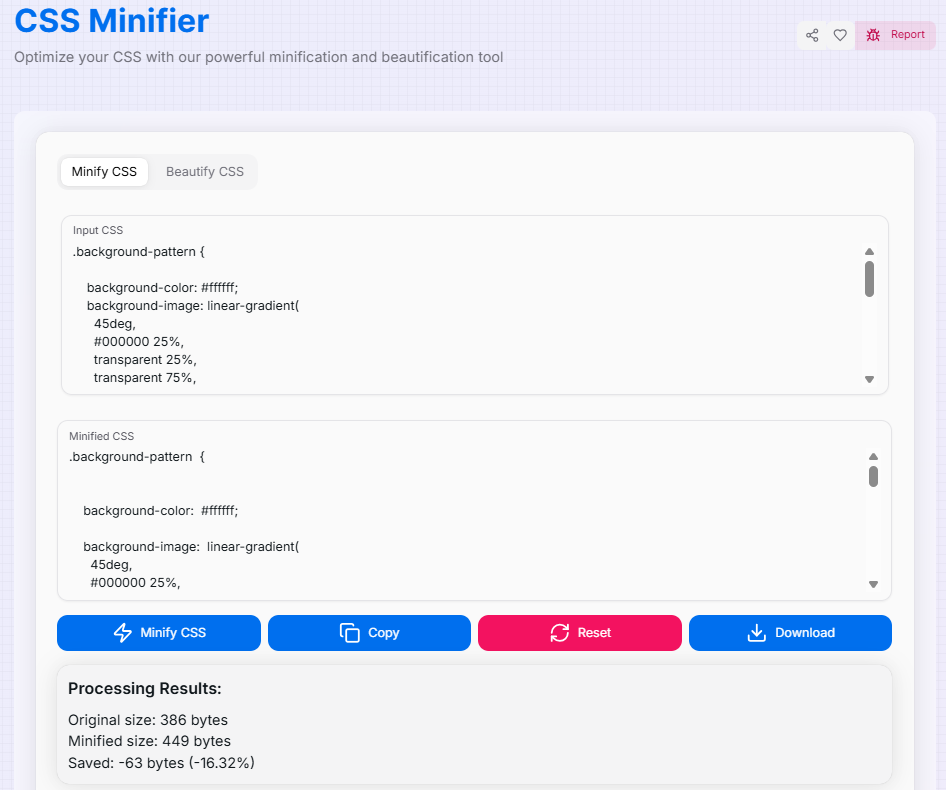
How to Use CSS Minifier and Beautifier?
- 1Select Your Mode:
Toggle between the Minify CSS (optimize for speed) or Beautify CSS (format for readability) tabs at the top.
- 2Load Your CSS:Input Methods:Paste your code directly into the input area or drag and drop a CSS file (up to 2MB) for automatic loading.
- 3Process & Inspect:
Hit the Minify or Beautify button. View the output instantly along with real-time statistics showing the exact percentage of file size reduction.
- 4Copy or Save:
Use Copy () to grab the result instantly, or Download the processed CSS as a file for your project.
Key Features
Tips and Best Practices
Production vs Dev
Always keep your original beautified file for development and use the minified version for your production server to improve load times.
Combining Files
For maximum efficiency, combine multiple CSS files into one before minifying. This reduces the number of HTTP requests your site makes.
Validation
Test your minified CSS thoroughly across browsers. While the logic remains the same, tiny syntax errors in the original can cause issues when minified.
Ready to supercharge your stylesheets? Whether you are aiming for a lightning-fast Google PageSpeed score or a perfectly organized code repository, the CSS Minifier and Beautifier is here to streamline your workflow. Start optimizing your CSS today!