JavaScript Minifier & Beautifier
Optimize your JS code for production or format it for readability using industry-standard Terser engine
Select Mode
Quick Presets
Upload JS File
What is the JavaScript Minifier?
The JavaScript Minifier is a high-performance optimization tool purpose-built for web developers. In modern web development, source code is written to be human-readable, filled with comments, long variable names, and whitespace. While great for humans, these additions increase file size and slow down browser load times.
This application leverages the powerful Terser engine to strip away every unnecessary character. From removing dead code and comments to "mangling" variable names into shorter versions, our tool ensures your scripts are as lean as possible. Whether you're a beginner launching your first site or an enterprise dev optimizing production bundles, this is your key to a faster web experience.
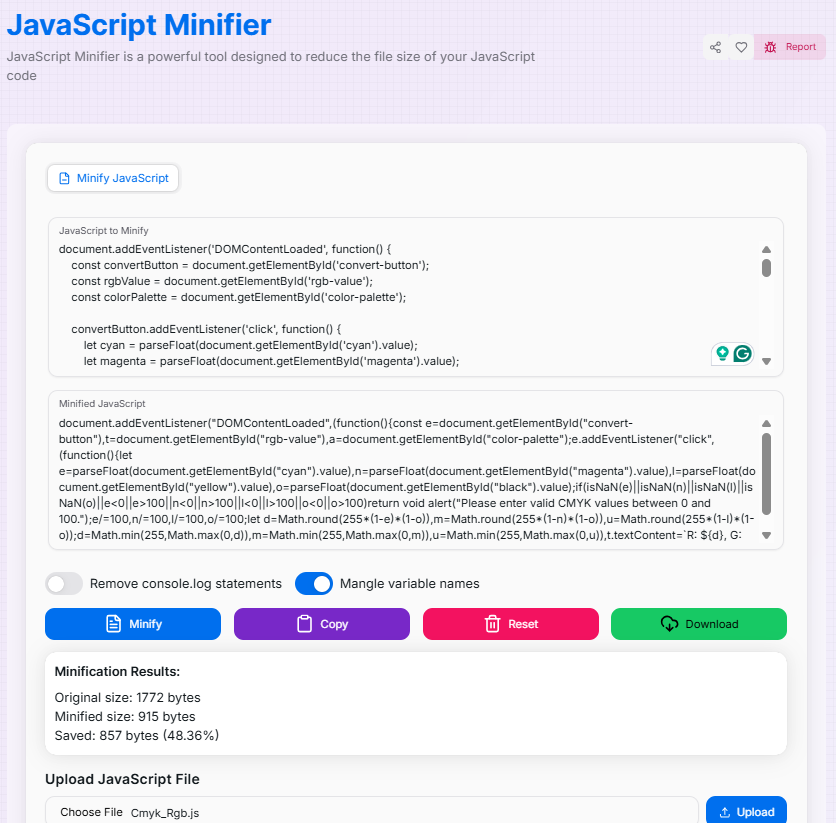
How to Use the JavaScript Minifier?
- 1Load Your Scripts:
Paste your JavaScript directly into the editor or upload a
.jsfile (up to 1MB) for automatic processing. - 2Configure Logic:Advanced Options:Toggle Variable Mangling for maximum compression or Remove Console Logs to clean up production code.
- 3Minify & Analyze:
Click the Minify button. Review the resulting code and check the Minification Statistics () to see exactly how much space you've saved.
- 4Export Output:
Use the Copy () button for quick clipboard use or Download the minified script as a file for your project.
Key Optimization Features
console.log) from your production-ready code.Pro Tips for Better Optimization
Keep Source Map
Always keep your original, unminified files. Minified code is impossible for humans to debug efficiently.
Mangling Warning
Variable mangling is safe for most code, but be careful if your script relies on string-matching function names (func.name).
Production First
Minification is a final step. Combine it with server-side GZIP compression to achieve the fastest possible load times for your users.
Ready to supercharge your web performance? Start minifying your JavaScript today and experience the difference between standard code and professional, machine-optimized delivery!