JSON Tree Viewer and Editor
A powerful tool to view, edit, and format JSON data with customizable options.
What is the JSON Tree Viewer and Editor?
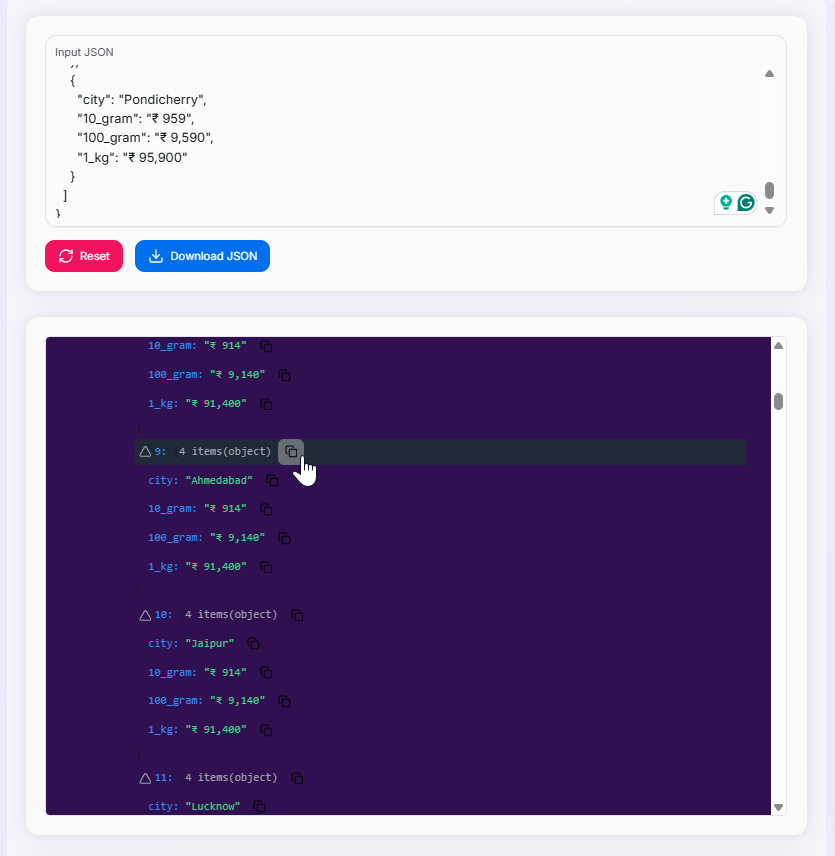
Think of the JSON Tree Viewer and Editor as an interactive X-ray machine for your data. In its raw form, nested JSON can be a daunting "wall of text." This tool transforms complex, minified, or deeply nested JSON strings into a beautiful, navigable, and interactive hierarchy.
Whether you are debugging a complex API response, auditing configuration files, or building data structures from scratch, this utility provides the clarity you need. With support for in-place editing, structural modification, and multiple aesthetic themes, it bridges the gap between raw machine data and human-friendly visualization.
How to Use the JSON Tree Viewer and Editor?
- 1Input Data:
Paste your raw JSON into the text area. The tool will automatically validate and parse the data, highlighting any syntax errors immediately.
- 2Navigate the Tree:
Use the expand and collapse icons to explore nested objects and arrays. Adjust Indentation and Icon Styles in the settings to suit your view.
- 3Modify Structure:
Enable editing features to modify values, add new properties, or delete elements directly within the tree visualization.
- 4Export:
Once your modifications are complete, Copy branches to your clipboard or Download the entire finalized JSON as a local file.
Key Features
Practical Applications
API Debugging
Paste raw API responses to quickly identify specific data points in massive nested payloads.
Config Management
Visually audit and edit complex .json configuration files for apps and services with confidence.
Data Analysis
Explore JSON datasets visually to understand relationships and hierarchy before implementation.
Technical Capabilities
Engineered to handle even the most deeply nested structures without performance degradation.
Uses smart rendering for large arrays and objects to keep the interface smooth and responsive.
Maintains accurate breadcrumbs and path info for precise editing of every single property.
Ensures your JSON logic remains valid throughout complex addition and deletion operations.
Whether you're a developer crafting APIs, a data scientist exploring datasets, or an engineer managing systems, the JSON Tree Viewer and Editor provides the ultimate balance of simplicity and surgical precision. Transform your JSON interaction today!