MD5 Hash Generator & Verifier
Generate and verify MD5 hashes with advanced options and features.
What is the MD5 Hash Generator & Verifier?
Think of an MD5 hash as a "digital fingerprint" for your data. The MD5 Hash Generator & Verifier is a specialized utility that takes any text or file and compresses it into a unique 32-character hexadecimal string. Even the tiniest change in the source data will result in a completely different fingerprint.
While MD5 is no longer recommended for high-security encryption (like passwords), it remains a "Swiss Army knife" for non-security tasks. It is widely used by developers and IT professionals for verifying file integrity, identifying duplicate data, and managing caching mechanisms where speed and consistency are more important than cryptographic invulnerability.
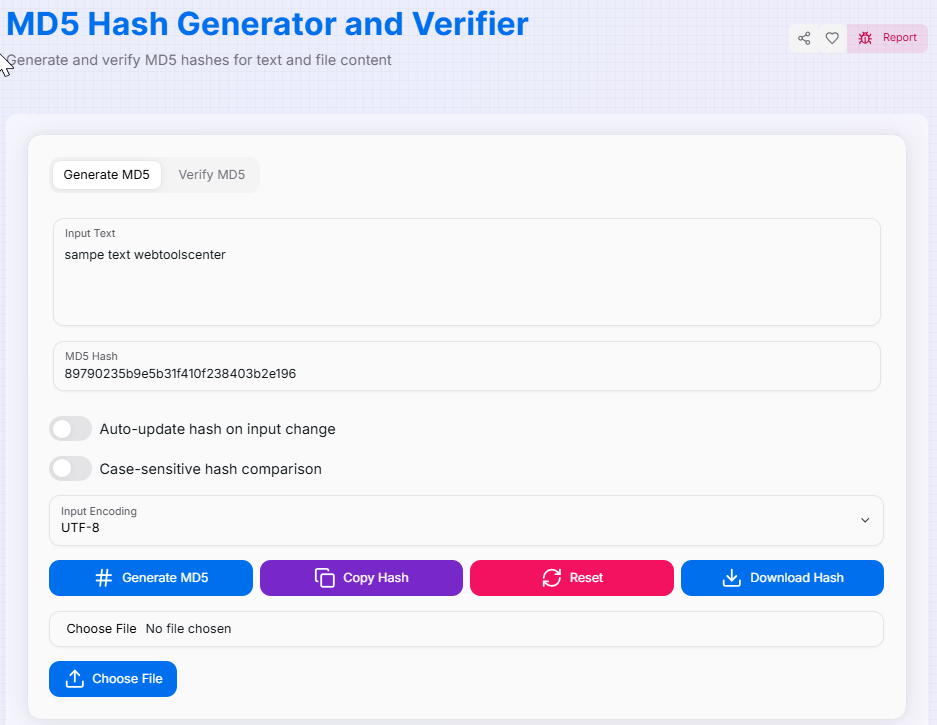
How to Use the MD5 Hash Generator & Verifier?
- 1Input Your Data:
Enter your text directly into the input area or use the File Upload feature to generate a checksum for local files.
- 2Select Encoding:Format Handling:Choose your input encoding (UTF-8, Base64, or Hexadecimal) to ensure the data is interpreted correctly before hashing.
- 3Generate or Verify:
Click Generate to create a new hash. To check data integrity, switch to the Verification tab and compare your source with an existing hash.
- 4Export Result:
Use Copy () to grab the hash instantly or Download the result for documentation. Hit Reset () to start a new session.
Key Features of MD5
Security & Best Practices
Vulnerabilities
MD5 is not cryptographically secure. It is vulnerable to "collision attacks" where different inputs produce the same hash.
Better Alternatives
For passwords or sensitive data, always use SHA-256 or SHA-3. Use MD5 only for non-critical checksums.
Use Cases
Perfect for data deduplication, file integrity checks (non-security), caching keys, and maintaining legacy systems.
While the MD5 algorithm has been superseded by stronger standards for security-critical tasks, it remains a fast and efficient tool for many development scenarios. Start using our generator today to streamline your data verification and integrity workflows!