JavaScript Formatter
Effortlessly beautify, clean, and standardize JavaScript and TypeScript code online with this professional Prettier-powered formatter and multi-parser tool.
Input JavaScript
Formatting Options
Parser Selection
Clean & Sort
Indentation
What is the JavaScript Formatter?
Think of the JavaScript Formatter as a digital organizer for your logic. As projects grow, JavaScript files often become a chaotic mix of inconsistent spacing, mismatched quotes, and cluttered console logs. Our tool leverages the power of the Prettier engine to automatically reorganize your script into a clean, industry-standard structure.
Whether you are a software engineer enforcing team standards, a web developer cleaning up minified snippets, or a student learning to write "clean code," this formatter does the heavy lifting. It ensures that every bracket, semicolon, and indentation level is perfectly placed, allowing you to focus on the functionality while we handle the aesthetics.
How to Use the JavaScript Formatter?
- 1Input Your Script:
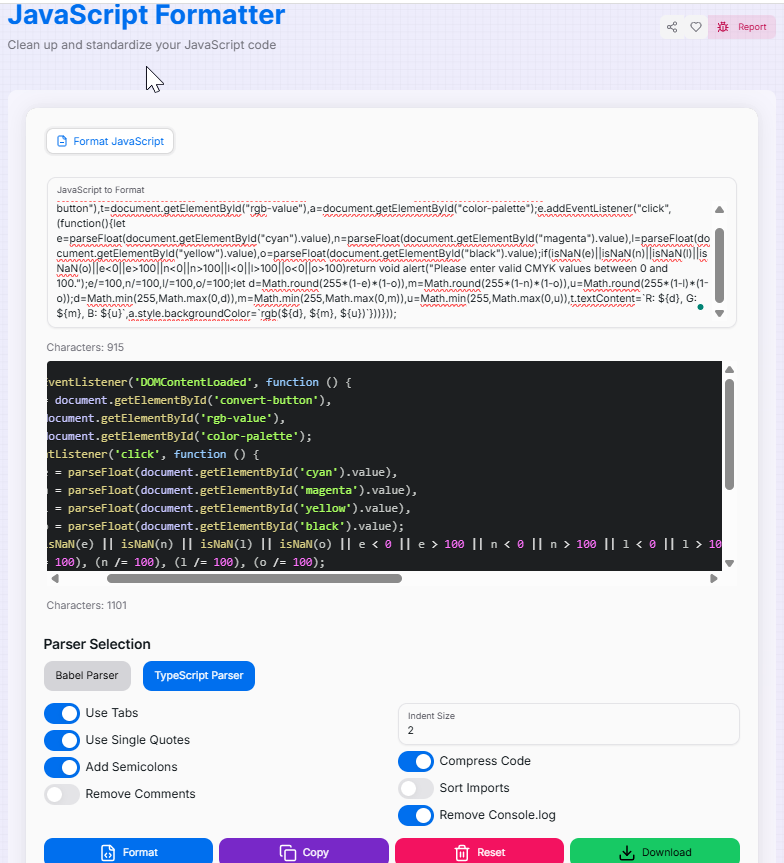
Paste your code directly into the editor or upload a JavaScript file to load your existing project.
- 2Customize Rules:Formatting Logic:Adjust indentation (tabs/spaces), choose between single or double quotes, and toggle semicolon insertion or Import Statement Sorting.
- 3Format & Refine:
Click the Format button. You can also toggle "Remove Console Logs" or use the Compression feature if you're preparing for production.
- 4Export:
Use Copy () to grab the formatted code instantly or Download it as a file. Use Reset () to clear and start over.
Key Features
console.log statements or comments to clean up code for production.Advanced Usage & Pro Tips
Build Pipeline
Use our formatted output as the baseline for your team's code reviews to ensure everyone follows the same standards.
Dev vs Prod
Experiment with different formatting options during development and use the Compression feature for final deployment.
Quality Check
Combine formatting with linting tools. A well-formatted script is significantly easier to debug and maintain long-term.
Ready to standardize your project? Start formatting your JavaScript now and experience the power of industry-standard, professional code organization in seconds!
More Coding Tools
CSS Formatter
Clean up and standardize your CSS code with advanced formatting options.
HTML Formatter
Clean up, standardize, and optimize your HTML code with advanced formatting options.
JavaScript Minifier
Optimize your JS code for production or format it for readability using industry-standard Terser engine.
JSON Validator and Formatter
Validate, format, and manipulate JSON with ease.
Code to Image Converter
Convert your code snippets into beautiful, shareable images with customizable themes, backgrounds, and styling.
HTML Minifier
Compress and optimize your HTML code with advanced minification options.