URL Encoder/Decoder
Professional URL processing with RFC 3986 compliance and deep analysis
Quick Presets
Input
Click to upload or drag & drop
TXT, HTML up to 5MB
Result
Configuration
Standard encoding (RFC 3986) is recommended for modern web applications.
Encoding Note
URLs only support ASCII characters. Symbols like # & ? / have special meanings and must be encoded if they are part of data.
Actions
About the URL Encoder/Decoder
Think of the URL Encoder/Decoder as a specialized translator for web addresses. In the architecture of the internet, certain characters like spaces, brackets, or slashes have specific functional meanings. If you need to include these as actual data within a URL, they must be converted into a "percent-encoded" format to prevent browser errors and ensure safe data transmission.
This advanced tool is designed for developers, SEO specialists, and IT professionals who need to ensure their links are compatible across all browsers and platforms. Whether you are handling complex query parameters, deep-linking, or bulk-processing data strings, this generator bridges the gap between readable text and web-standard URI components.
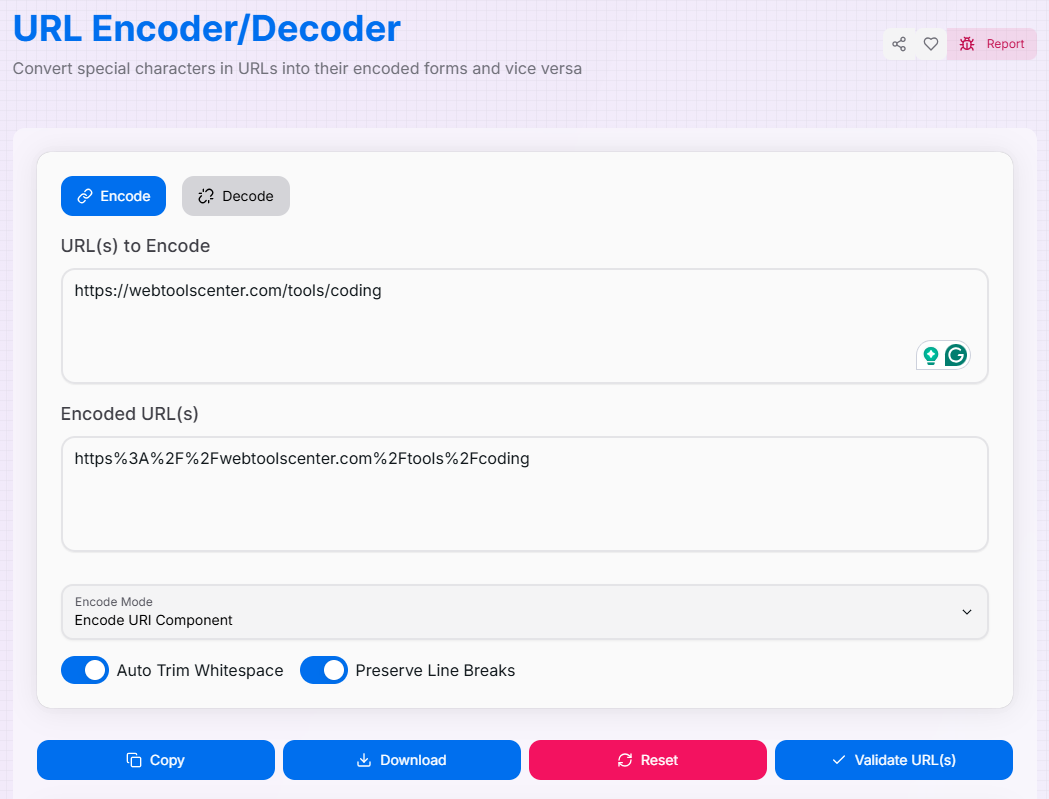
How to Use the URL Encoder/Decoder?
- 1Select Mode & Input:
Choose the Encode or Decode tab. Enter your URL(s) manually in the text area, or click Upload File to process a text document (up to 5MB).
- 2Configure Processing:Refine the Output:Toggle Auto Trim Whitespace or Preserve Line Breaks. Select your mode: Standard, Encode/Decode URI Component, or Encode All Characters for maximum safety.
- 3Validate & Preview:
The conversion happens in real-time. Use the Validate URL(s) button to ensure your results follow standard web formatting and remain functional.
- 4Export Result:
Use Copy to grab your results instantly or Download Result to save the processed content as a `.txt` file. Hit Reset () to clear everything.
Tips and Best Practices
Common Pitfalls and How to Avoid Them
Double Encoding
Be cautious not to encode already encoded URLs. This can create confusing strings like %2520 and lead to broken redirects.
Incomplete Decoding
Standard decoders might miss '+' symbols or specific URI components. Always verify you've selected the correct mode for your input type.
Character Sets
Ignoring the character encoding of your input can result in "mojibake" (corrupted text). Pay close attention to file charsets during upload.
Structural Logic
Paths, queries, and fragments require different encoding logic. Don't assume a "one size fits all" approach for complex URL structures.
Security Considerations
Be wary of decoding unknown strings, as they may contain malicious script injections or obfuscated redirects.
Always validate and sanitize URLs before using them in applications to prevent Cross-Site Scripting (XSS) attacks.
Use appropriate encoding methods based on where the URL will be used (e.g., HTML vs. JavaScript contexts).
If implementing URL logic in production, use rate limiting to prevent automated abuse of your endpoints.
Keep your backend URL processing libraries up to date to defend against known encoding vulnerabilities.
Implement proper error handling to ensure sensitive server information isn't exposed through URL processing errors.
Mastering URL encoding is essential for a clean and secure web presence. Start using the URL Encoder/Decoder today to experience the perfect balance of professional-grade precision and user-friendly efficiency. Ensure your links are safe, valid, and functional every time!
More Coding Tools
Base64 Encoder/Decoder
Encode and decode data using Base64 encoding with advanced features.
JWT Encoder/Decoder
Securely encode and decode JSON Web Tokens (JWT) for authentication and data exchange.
HTML Encoder/Decoder
Safely convert HTML characters to entities and vice versa for web development.
URL Slug Generator
Convert any text into a clean, SEO-friendly URL slug with advanced customization options.
JavaScript Formatter
Effortlessly beautify, clean, and standardize JavaScript and TypeScript code online with this professional Prettier-powered formatter and multi-parser tool.
Advance JSON Tree Viewer
A powerful tool to view, edit, and format JSON data with customizable options.