Image to Base64 Converter
Effortlessly convert your images to Base64 encoded strings for easy embedding in HTML, CSS, or JavaScript
What is the Image to Base64 Converter?
The Image to Base64 Converter is a powerful tool designed to convert image files into Base64 encoded strings. This conversion process allows developers and designers to embed image data directly into their HTML, CSS, or JavaScript files, avoiding the need for external file requests.
Base64 encoding represents binary data using a set of 64 characters. This makes it possible to include image data within text-based formats, which is particularly useful in web development, API data transmission, and scenarios where handling binary files directly is complex or restricted.
How to Use the Converter?
- 1Upload Images:
Navigate to the "Upload" tab and drag & drop your files or click to select them. The tool supports multiple file uploads.
- 2Automatic Conversion:Instant Processing:The tool automatically converts your images to Base64 format immediately upon upload.
- 3Manage Results:
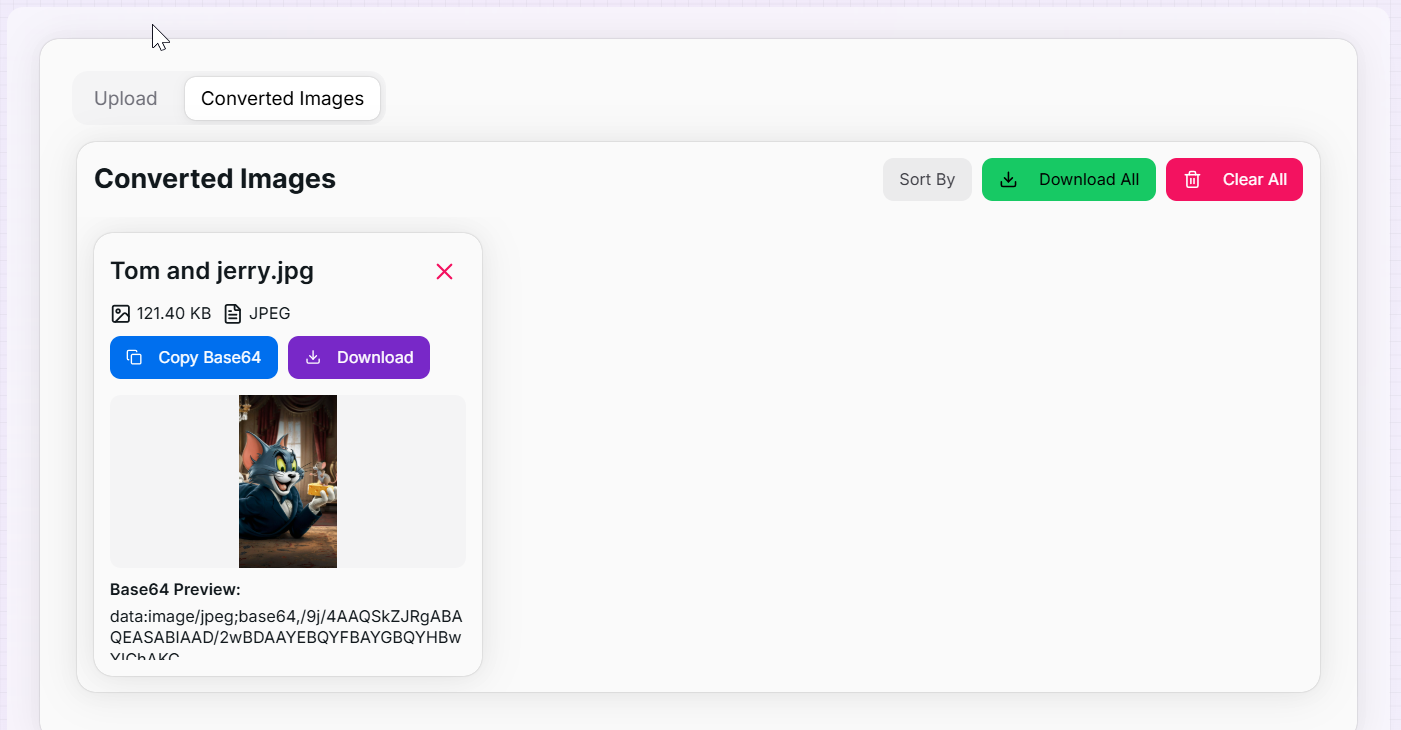
Switch to the "Converted Images" tab. Use the "Sort By" dropdown to organize files by name, size, or type, or view previews.
- 4Export Data:
Copy strings to clipboard, download individual text files, or use the "Download All" button to get a ZIP of all data.
Key Features
Common Use Cases
Web Development
Embed small icons and logos directly into HTML or CSS files to reduce HTTP requests and speed up page load times.
Data Storage
Store images in JSON documents or databases (like MongoDB) that prefer text-based data over binary blobs.
Email Templates
Include images in email signatures or newsletters where external image hosting might be blocked or unreliable.
Offline Apps
Ensure images display in offline-capable web applications (PWAs) by embedding the data directly in the code.
Security
Transmit image data securely via JSON APIs without worrying about multipart form data or file upload vulnerabilities.
CSS Backgrounds
Use Base64 strings in CSS `background-image: url(...)` properties to create self-contained stylesheets.
Technical Highlights
- Drag and Drop Support: Intuitive interface allows you to easily drop files anywhere in the upload zone.
- Performance Optimized: Enforces a 10MB file size limit per image to ensure browser performance and stability.
- Fully Responsive: Works seamlessly on desktop computers, tablets, and mobile devices.
- Easy Cleanup: Remove individual images or use the clear button to reset the tool instantly.
- Flexible Export: Whether you need a simple copy-paste or a file download, we support all export methods.
Ready to streamline your web development workflow? Use our Image to Base64 Converter to quickly generate embeddable code for your projects. Simplify your asset management and reduce external dependencies today!
More Image Tools
Base64 to Image Converter
Effortlessly convert Base64 encoded strings back to images for easy viewing and downloading.
Image Average Color Finder
Analyze images to find their average and dominant colors effortlessly. Perfect for designers, artists, and anyone looking to create cohesive color palettes for their projects.
Image Color Extractor Tool
Effortlessly extract dominant colors from images and create stunning color palettes for your projects.
Image Resizer
Resize images to specific dimensions effortlessly. Choose from PNG, JPEG, or WebP formats and preserve quality for web use and social media.
PNG to SVG Converter
Convert PNG images to SVG format.
PNG to WebP Converter
Convert your PNG, JPG, and JPEG images to WebP format for faster websites and smaller file sizes.