HTML Minifier
Compress and optimize your HTML code with advanced minification options
Quick Presets
Upload HTML File
Max 10MB • HTML, HTM
What is the HTML Minifier?
The HTML Minifier is a precision performance tool designed to strip away the "digital weight" from your web pages. In development, we use spaces, comments, and newlines to make code readable for humans; however, browsers don't need these to render a page.
This advanced tool optimizes your HTML by removing unnecessary characters and optional tags, significantly decreasing file size. The result is faster loading times, reduced bandwidth usage, and a better overall experience for your users. It is an essential utility for developers and site owners aiming for a lean, high-performance web presence.
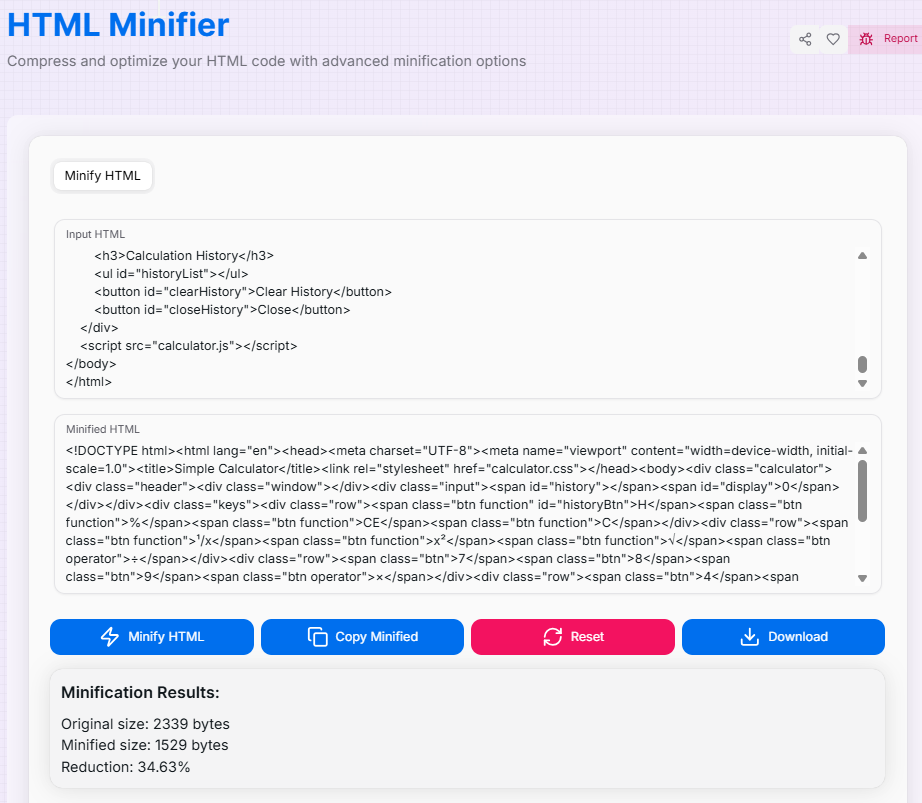
How to Use the HTML Minifier?
- 1Load Your Code:
Paste your HTML directly into the input area or upload an HTML file using the drag-and-drop feature.
- 2Set Aggressiveness:Custom Optimization:Adjust the minification aggressiveness slider and toggle specific options like removing comments or collapsing whitespace.
- 3Minify & Preview:
Click Minify HTML. Use the Show Preview () button to verify that the optimized code renders perfectly in the browser.
- 4Export:
Check your Minification Stats to see the space saved, then Copy () the result or download it as a new file.
Key Features for Optimization
Pro Tips
Always Backup
Always keep a "Human-Readable" version of your source code. Minification is for the browser, not for editing.
Browser Testing
Be cautious with removing optional tags; while modern browsers handle it well, some legacy systems might require them.
Combined Speed
For ultimate performance, combine minification with server-side GZIP or Brotli compression.
Ready to supercharge your site's performance? Start minifying your HTML today and bridge the gap between human-readable code and machine-optimized delivery!
More Coding Tools
HTML Formatter
Clean up, standardize, and optimize your HTML code with advanced formatting options.
CSS Minifier
Optimize your CSS with powerful minification and beautification tools.
JavaScript Minifier
Optimize your JS code for production or format it for readability using industry-standard Terser engine.
HTML Encoder/Decoder
Safely convert HTML characters to entities and vice versa for web development.
CSS Formatter
Clean up and standardize your CSS code with advanced formatting options.
Advance JSON Tree Viewer
A powerful tool to view, edit, and format JSON data with customizable options.