Color Shades Generator
Generate and explore harmonious color shades for your projects with advanced features
Your Palette
What is the Color Shades Generator?
The Color Shades Generator is a sophisticated design engine built to expand a single point of inspiration into a full monochromatic system. It allows designers and developers to generate a series of harmonious tints and shades based on a single anchor color, ensuring visual rhythm and mathematical consistency across any project.
Whether you are building a complex UI with multiple depth layers or creating a brand style guide, this tool removes the manual labor of color mixing. By adjusting luminosity and saturation values programmatically, it provides the exact HEX, RGB, HSL, and CMYK codes needed for both digital interfaces and high-quality print production.
How to Use the Color Shades Generator?
- 1Define Your Base:
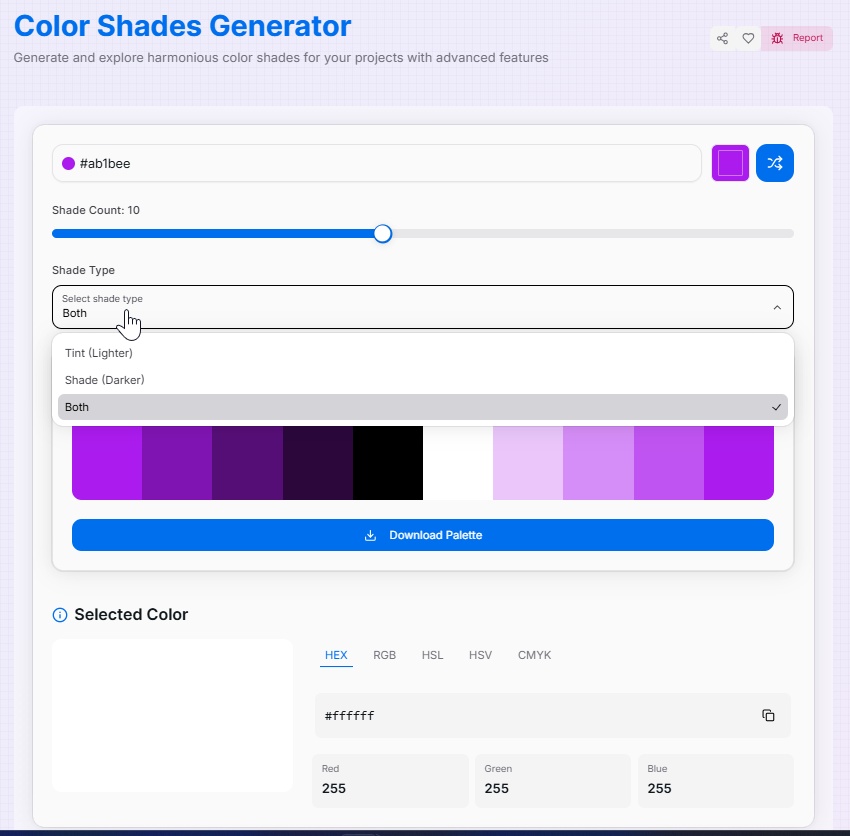
Enter a HEX code or use the Color Picker to select your starting point. This color will act as the anchor for your generated palette.
- 2Adjust Granularity & Type:
Use the slider to set your step count (2 to 20 shades). Select your Variation Type: Tints (lighter), Shades (darker), or Both for a full spectrum.
- 3Analyze and Copy:
Click any generated swatch to view details in HEX, RGB, HSL, HSV, or CMYK. Click the Copy icon next to any value to grab it instantly.
- 4Export Palette:
Download the entire palette as a PNG image for easy sharing or to import your new color system into design tools like Figma or Photoshop.
Key Features for Designers
Pro Tips & Best Practices
Tint Strategy
Use lighter tints (the 10-30% range) for background hover states to keep the interface feeling responsive and modern.
Shade Depth
Combine deep shades with the base color to create high-contrast text combinations that pass WCAG accessibility standards.
Print Accuracy
Always verify CMYK values when moving from screen to print to ensure vibrant tints don't appear muddy in physical ink.
Integration & Workflow
CSS Variables
Build a robust `--color-primary-100` to `--color-primary-900` scale for Tailwind or Vanilla CSS effortlessly.
Design Systems
Create monochromatic style guides that ensure brand consistency across web, mobile, and marketing assets.
UI Hierarchy
Use different shades of a single hue to define borders, shadows, and secondary actions without cluttering the palette.
The Color Shades Generator is your shortcut to professional palette design. By combining mathematical precision with creative freedom, you can build cohesive color systems that elevate your visual projects. Start generating your perfect shades today!
More Color Tools
Color Name Generator
Explore color theory and generate harmonious palettes with our advanced color wheel tool.
AI Color Palette Generator
Create the perfect color scheme with AI assistance.
Color Gradient Generator
Create stunning CSS gradients with advanced features and a modern interface.
Color Mixer
Mix colors, generate shades, and explore different color formats with advanced features.
Image Color Extractor
Effortlessly extract dominant colors from images and create stunning color palettes for your projects.
Color Converter
Convert colors between HEX, RGB, HSL, HSV, and RGBA formats with advanced features.