YouTube Hashtag Extractor
Extract all hashtags from any YouTube video's title and description instantly
Paste a YouTube video URL to extract hashtags
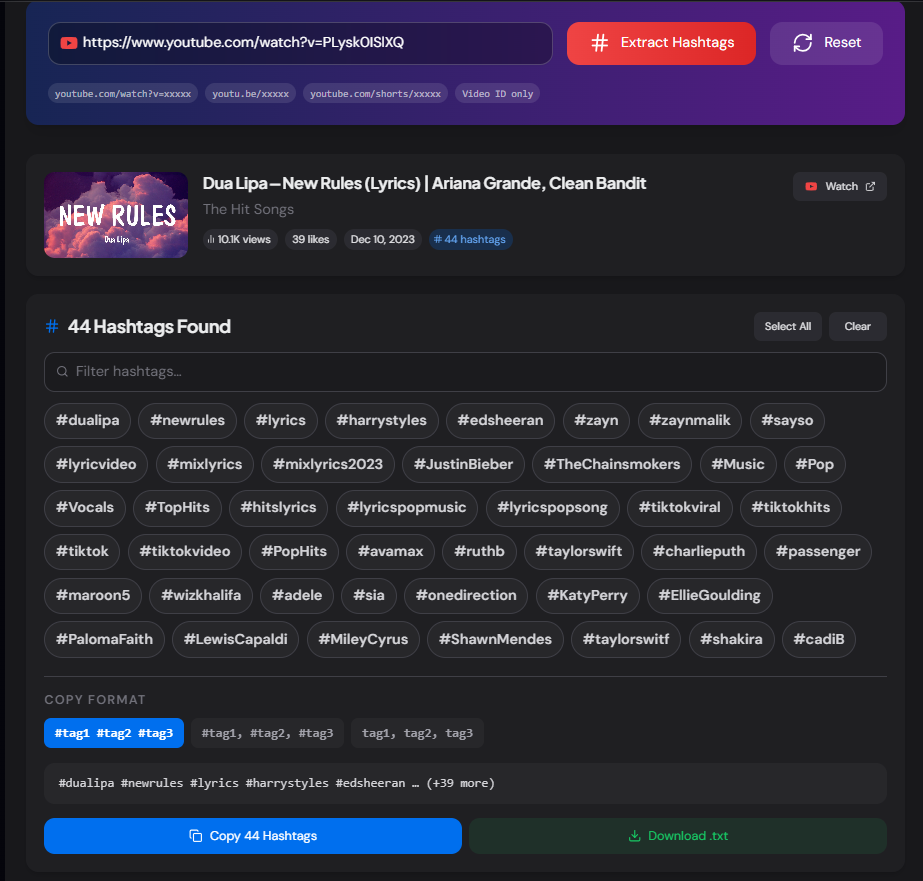
Extracts every #hashtag from the video title and description. Click individual hashtags to select them, then copy or download in your preferred format.
What is the YouTube Hashtag Extractor?
The YouTube Hashtag Extractor is a free tool that instantly extracts every #hashtag from any YouTube video's title and description. Paste a video URL or video ID and get a clean, interactive list of all hashtags with options to filter, select individual tags, and copy them in multiple formats — or download as a .txt file.
YouTube hashtags appear in two places: the video title (where YouTube displays the first three as clickable links above the title) and the video description (where any #word becomes a searchable hashtag). This tool scans both sources and deduplicates the results, giving you the complete hashtag set a creator used for a given video.
How to Use the YouTube Hashtag Extractor
- 1Paste the Video URL or ID:
Paste any YouTube video URL such as
youtube.com/watch?v=xxxxx,youtu.be/xxxxx, or a Shorts URL, then click "Extract Hashtags". - 2Browse and Filter Hashtags:
All hashtags are shown as clickable pills. Use the filter input to search within the list, and click individual hashtags to select or deselect them. Use Select All or Clear to manage the selection.
- 3Choose a Copy Format:
Three formats are available — space-separated with # symbols (ready to paste into a YouTube description), comma-separated with #, or plain words without #. The preview updates instantly so you know exactly what will be copied.
- 4Copy or Download:
Click Copy Hashtags to copy the selected tags (or all tags if none selected) to your clipboard, or Download .txt to save a complete file with all formats, video info, and the full hashtag list.
Key Features
How YouTube Hashtags Work
Title Hashtags
The first 3 hashtags in a video title appear as blue clickable links directly above the title on the watch page. These are the most visible hashtags and carry the most weight for discoverability within YouTube search.
Description Hashtags
Hashtags in the description are clickable and searchable but don't appear above the title. YouTube recommends using no more than 15 hashtags per video — using more than 60 causes YouTube to ignore all hashtags entirely.
Hashtag Search
Clicking any hashtag on YouTube takes you to a feed of videos using that exact tag. Using relevant, low-to-medium competition hashtags helps videos appear in those feeds alongside similar content rather than being buried by high-volume tags.
Pro Tips for Using Extracted Hashtags
Competitor Research
Extract hashtags from your top-performing competitors' videos in your niche. Look for hashtags that appear consistently across multiple high-view videos — those are likely driving traffic.
Mix Broad and Niche
Use the selection feature to pick a mix — 3–4 broad hashtags (#youtube, #tutorial) for discoverability and 4–6 niche hashtags specific to your topic for targeting a more relevant audience.
Front-Load Your Best 3
Only the first 3 hashtags in your title appear as clickable links above the video. Put your highest-value hashtags first. Use the space-separated copy format to paste them directly at the start of your description.
Real-World Applications
Content Strategy
Analyse the hashtag patterns of channels in your niche to understand which tags they use consistently across their best-performing videos for your own strategy.
SEO Auditing
Audit your own channel's published videos to ensure consistent hashtag use across similar content — identify videos that are missing key hashtags that your other videos use successfully.
Bulk Research
Extract and download hashtag lists from multiple reference videos, then combine them in a spreadsheet to identify the most frequently used tags across an entire topic or niche.
Related YouTube Tools
YouTube Keyword Tag Extractor
Extract the hidden keyword tags (not the same as hashtags) from any YouTube video.
YouTube Description Extractor
Extract the full description of any YouTube video for analysis or reference.
YouTube Metadata Extractor
Extract complete video metadata including title, description, tags, and stats.
YouTube Transcript Extractor
Extract and download the full text transcript of any YouTube video.
The YouTube Hashtag Extractor gives you instant access to the exact hashtags any creator uses on their videos — no guesswork, no manual copy-pasting from descriptions. Whether you're researching competitors, building a hashtag library, or auditing your own channel's SEO, paste the URL and extract in seconds. Free, no sign-up, no limits.
More YouTube Tools
YouTube Description Extractor
Extract and copy descriptions from any YouTube video, including links, hashtags, and complete description text.
YouTube Transcript Extractor
Extract and download transcripts from any YouTube video. View, copy, and save subtitles with or without timestamps instantly.
YouTube Keyword Tag Extractor
Extract keyword tags from any YouTube video.
YouTube Metadata Extractor
Extract comprehensive metadata from any YouTube video.
YouTube Video Statistics Checker
Check YouTube video statistics including views, likes, comments, duration, publish date, tags, hashtags, and engagement metrics.
YouTube Channel Comparison
Compare two YouTube channels side by side. Analyze subscribers, total views, video count, creation date, country, and other channel statistics.