YouTube Transcript Extractor
Extract and download transcripts from any YouTube video. View, copy, and save subtitles with or without timestamps instantly.
Paste a YouTube video URL to extract its transcript
Works with any video that has captions — manual or auto-generated. Copy the text, download as TXT or SRT, toggle timestamps on or off.
What is the YouTube Transcript Extractor?
The YouTube Transcript Extractor is a free tool that pulls the full spoken transcript from any YouTube video — instantly, with no login or API key required. It works with both manually created captions and YouTube's auto-generated speech-to-text tracks, supporting multiple languages wherever available.
Whether you are a blogger turning video content into articles, a student taking notes, a researcher building a dataset, or an AI user feeding context into a language model, this tool removes the manual transcription step entirely. Paste a URL and get the full text in seconds — with the option to keep or strip timestamps, copy to clipboard, or download as a clean TXT file or a standard SRT subtitle file.
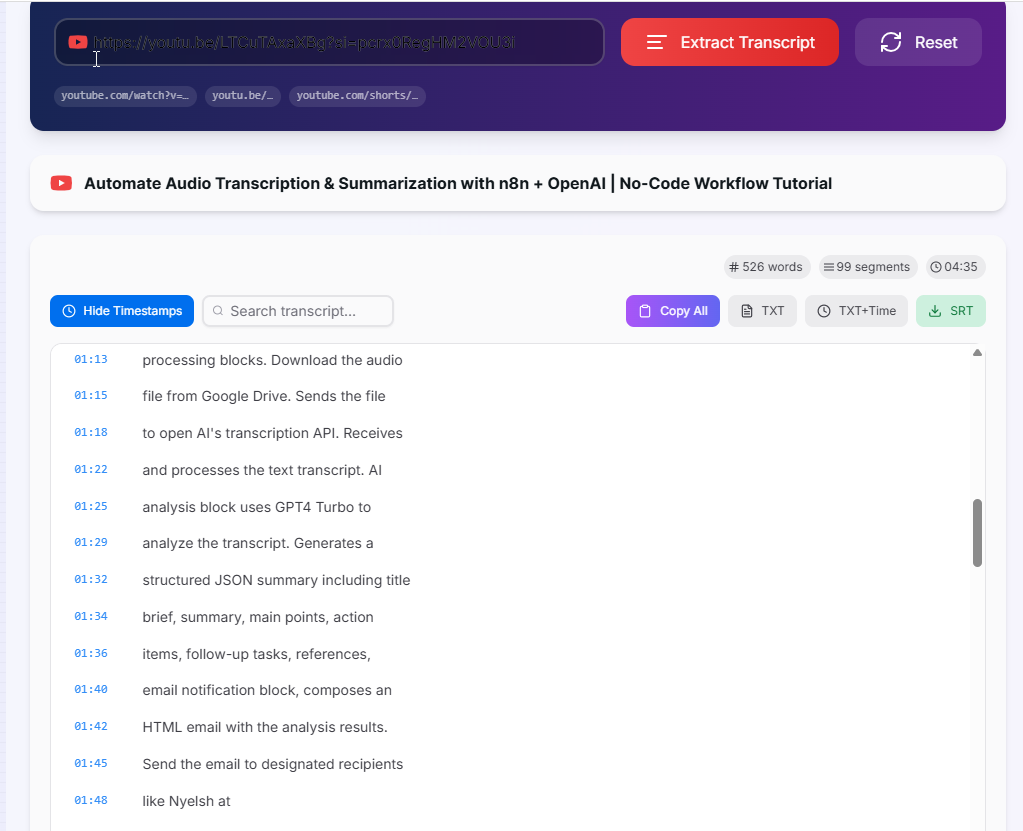
How to Use the YouTube Transcript Extractor?
- 1Paste the Video URL:
Copy the YouTube video link from your browser and paste it into the input field. Supports
watch?v=,youtu.be/, and Shorts URLs. Click "Extract Transcript". - 2Select a Language (optional):
If the video has captions in multiple languages, a language dropdown appears automatically. Switch languages and the transcript reloads instantly — no need to re-paste the URL.
- 3Toggle Timestamps:
Use the "Show / Hide Timestamps" button to switch between a clean readable transcript and a time-coded version. The copy and download functions respect this toggle automatically.
- 4Copy or Download:
Click Copy All to copy to the clipboard, TXT for a plain text file, TXT+Time for timestamped text, or SRT to download a standard subtitle file compatible with video editors and media players.
Key Features
Pro Tips for Maximum Value
AI Prompting
Copy the plain-text transcript (timestamps hidden) and paste it directly into ChatGPT, Claude, or Gemini to summarize, translate, extract key points, or generate a blog post from the video.
Quote Hunting
Use the in-transcript search to jump straight to a keyword. The timestamp next to the result tells you the exact moment in the video — handy for citations, clips, or social media pull quotes.
Subtitle Editing
Download the SRT file and open it in Subtitle Edit, DaVinci Resolve, or Premiere Pro to clean up auto-generated captions before re-uploading corrected subtitles to your own channel.
Real-World Applications
Content Repurposing
Convert video lectures, interviews, and tutorials into blog posts, newsletters, or social media threads without typing a single word manually.
Academic Research
Extract verbatim transcripts for qualitative research, discourse analysis, or building text corpora from YouTube's vast archive of educational and documentary content.
Accessibility
Download corrected SRT files to add accurate, human-readable subtitles to your videos, improving accessibility for deaf and hard-of-hearing viewers and boosting SEO.
The YouTube Transcript Extractor is the fastest way to turn video content into usable text. From a single URL you get a fully searchable, downloadable transcript in multiple formats — ready to feed into an AI, drop into a document, or import into a video editor. No account, no extension, no cost. Start extracting transcripts now.
More YouTube Tools
YouTube Hashtag Extractor
Extract hashtags from any YouTube video or channel description. Find trending hashtags, copy them instantly, and improve your YouTube SEO strategy.
YouTube Description Extractor
Extract and copy descriptions from any YouTube video, including links, hashtags, and complete description text.
YouTube Keyword Tag Extractor
Extract keyword tags from any YouTube video.
YouTube Metadata Extractor
Extract comprehensive metadata from any YouTube video.
YouTube Channel Statistics Viewer
View YouTube channel statistics including subscribers, total views, video count, country, creation date, and channel information.
YouTube Thumbnail Downloader
Download high-quality thumbnails from any YouTube video.