YouTube Description Extractor
Extract and copy the full description from any YouTube video
Paste a YouTube URL to extract its description
Instantly view, copy, search, and download the full description of any public YouTube video.
What is the YouTube Description Extractor?
The YouTube Description Extractor is a free tool that instantly pulls the full description from any public YouTube video — no login, no browser extension, no copy-paste hunting through the YouTube interface. Paste a video URL and get the complete, untruncated description text in one click.
YouTube descriptions are often packed with timestamps, links, affiliate disclosures, social profiles, and SEO keywords that are hidden behind a "Show more" button. This tool surfaces all of it at once, with built-in character and word counts, a keyword search, and one-click copy and download — making it indispensable for SEO research, competitor analysis, and content repurposing.
How to Use the YouTube Description Extractor?
- 1Paste the Video URL:
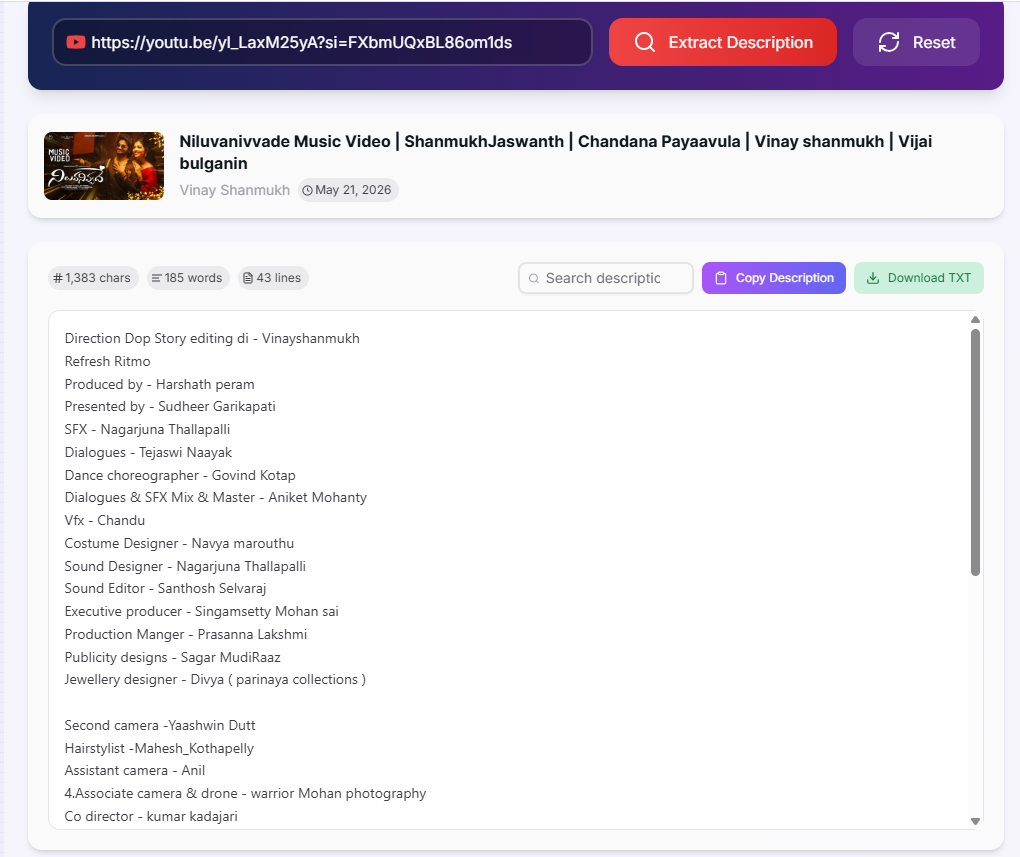
Copy the YouTube video link from your browser address bar and paste it into the input field. Click "Extract Description".
- 2Read the Full Description:
The complete, untruncated description appears instantly along with the video thumbnail, channel name, publish date, and stats — character count, word count, and line count.
- 3Search Within the Description:
Use the search box to filter for a specific keyword. Matches are highlighted in yellow and a match count is shown — useful for locating timestamps, links, or specific CTAs quickly.
- 4Copy or Download:
Click Copy Description to copy the full text to your clipboard, or click Download TXT to save it as a text file — title included — for offline reference or documentation.
Key Features
Pro Tips for SEO & Research
Competitor SEO Audit
Extract the descriptions of the top 5 ranking videos for your target keyword. Use the word count and keyword search to reverse-engineer which phrases and CTAs appear most consistently in high-performing descriptions.
Description Templates
Download descriptions from your best-performing videos as TXT files and use them as structural templates. Compare character counts across videos to find the sweet spot for your niche.
AI Prompt Input
Copy a description and paste it into ChatGPT or Claude as context. Ask it to rewrite the description for a different audience, improve the CTA, or translate it — all without retyping a word.
Real-World Applications
Content Creators
Study the description structure of viral videos in your niche to understand what timestamps, links, and calls-to-action drive the most engagement.
SEO Specialists
Extract and analyse keyword density in competitor descriptions to refine your own YouTube SEO strategy and identify gaps in your content metadata.
Researchers & Journalists
Quickly archive the full description of a video for citation, fact-checking, or documentation — especially useful before a video is edited or taken down.
The YouTube Description Extractor turns a two-minute manual task into a two-second automated one. Whether you are auditing competitor SEO, building a description template library, or feeding video metadata into an AI tool, having the full description text at your fingertips — complete with stats, search, and export — gives you a measurable edge. Start extracting descriptions now.
More YouTube Tools
YouTube Hashtag Extractor
Extract hashtags from any YouTube video or channel description. Find trending hashtags, copy them instantly, and improve your YouTube SEO strategy.
YouTube Transcript Extractor
Extract and download transcripts from any YouTube video. View, copy, and save subtitles with or without timestamps instantly.
YouTube Keyword Tag Extractor
Extract keyword tags from any YouTube video.
YouTube Metadata Extractor
Extract comprehensive metadata from any YouTube video.
YouTube Video Statistics Checker
Check YouTube video statistics including views, likes, comments, duration, publish date, tags, hashtags, and engagement metrics.
YouTube Channel Statistics Viewer
View YouTube channel statistics including subscribers, total views, video count, country, creation date, and channel information.