YouTube Video Statistics Checker
Analyse any YouTube video — engagement rates, view velocity, watch time estimates, tags, hashtags, and thumbnails
Paste a YouTube video URL to analyse it
Get engagement rates, view velocity, estimated watch time, tags, hashtags, and thumbnail downloads — not just raw numbers.
What is the YouTube Video Statistics Checker?
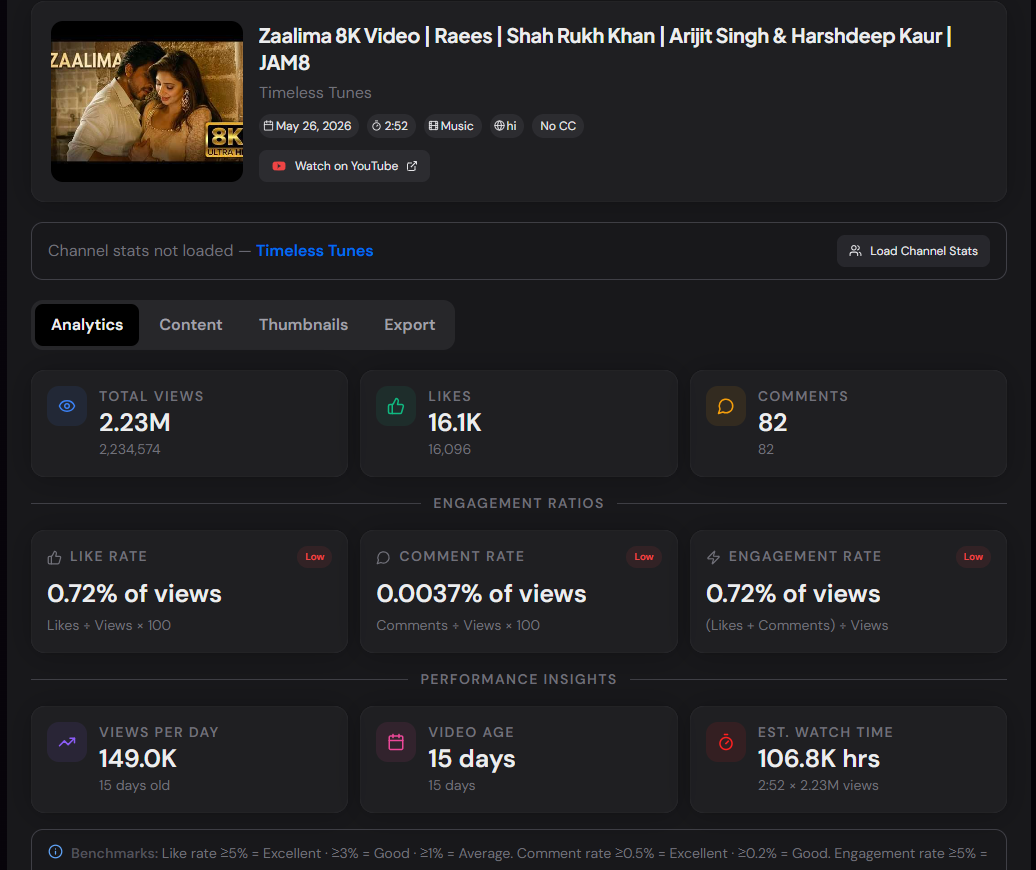
The YouTube Video Statistics Checker is an analytics-focused tool that goes beyond raw view counts. Paste any YouTube video URL and get engagement rates, view velocity, estimated total watch time, video age, tags, hashtags, and thumbnail downloads — all in one place without needing YouTube Studio access or any account.
The difference between this tool and a basic metadata extractor is the derived metrics. A video with 1 million views and 50,000 likes has a 5% like rate — which is excellent. The same view count with 5,000 likes is 0.5% — below average. Raw numbers without context don't tell you how a video is actually performing relative to its audience.
How to Use the YouTube Video Statistics Checker
- 1Paste the Video URL or ID:
Paste any YouTube video URL (youtube.com/watch?v=, youtu.be/, or Shorts) and click "Check Statistics".
- 2Review the Analytics Tab:
The Analytics tab shows three raw stat cards (views, likes, comments), three ratio metric cards with performance ratings (like rate, comment rate, engagement rate), plus view velocity, video age, and estimated total watch time.
- 3Inspect Content and Tags:
The Content tab lists video metadata, all keyword tags with a copy button, all hashtags with a copy button, and the full description.
- 4Download Thumbnails:
The Thumbnails tab shows three sizes — Default, High, and Max Resolution — each with a format selector (JPG/PNG/WEBP) and a one-click download button via server-side conversion.
- 5Export the Full Report:
The Export tab generates a formatted text report with all statistics, ratios, tags, and hashtags. Copy to clipboard or download as a named .txt file.
Understanding the Metrics
Pro Tips
Benchmark Your Own Videos
Check your 5 most recent uploads and compare their like rates and comment rates. Patterns in what your audience engages with more should inform your next video's format, length, and topic.
Check Competitors at Scale
For a competitor with 20 videos on a topic, spot-check 3–4 of their highest-view videos using this tool. If their view velocity has dropped significantly, the topic may be saturating.
Use Thumbnails for Swipe Files
Download the max-resolution thumbnail from top-performing videos in your niche. Build a swipe file of design patterns — colour palettes, text placement, face expressions — to inform your own thumbnail design.
Real-World Applications
Creator Research
Understand why certain videos outperform others — engagement metrics reveal audience response independent of upload timing or promotion.
Sponsorship Vetting
Brands can assess whether a channel's view counts reflect real engagement or inflated numbers by checking like and comment rates across multiple videos.
SEO Strategy
Extract the tags and hashtags from top-ranking videos in your niche to understand what metadata successful creators use to get discovered.
Related YouTube Tools
YouTube Channel Statistics Viewer
View subscriber count, total views, video count, and derived channel-level metrics.
YouTube Metadata Extractor
Extract raw video metadata for API use — title, description, tags, publish date.
YouTube Hashtag Extractor
Extract only the hashtags from a video with filter, select, and copy options.
YouTube Keyword Tag Extractor
Extract the hidden keyword tags that aren't shown to viewers but influence search.
The YouTube Video Statistics Checker gives you actionable analytics on any public YouTube video — engagement ratios, view velocity, watch time estimates, content metadata, and thumbnail downloads. Everything a creator, researcher, or brand needs to evaluate video performance, without needing YouTube Studio access or API credentials.
More YouTube Tools
YouTube Channel Statistics Viewer
View YouTube channel statistics including subscribers, total views, video count, country, creation date, and channel information.
YouTube Video Comparison Tool
Compare two YouTube videos side by side. Analyze views, likes, comments, engagement rate, view velocity, duration, and publishing performance.
YouTube Channel Comparison
Compare two YouTube channels side by side. Analyze subscribers, total views, video count, creation date, country, and other channel statistics.
YouTube Description Extractor
Extract and copy descriptions from any YouTube video, including links, hashtags, and complete description text.
YouTube Hashtag Extractor
Extract hashtags from any YouTube video or channel description. Find trending hashtags, copy them instantly, and improve your YouTube SEO strategy.
YouTube Keyword Tag Extractor
Extract keyword tags from any YouTube video.