YouTube Channel Statistics Viewer
View detailed statistics for any YouTube channel — subscribers, views, video count, channel age, and derived metrics
Paste a YouTube channel URL or @handle
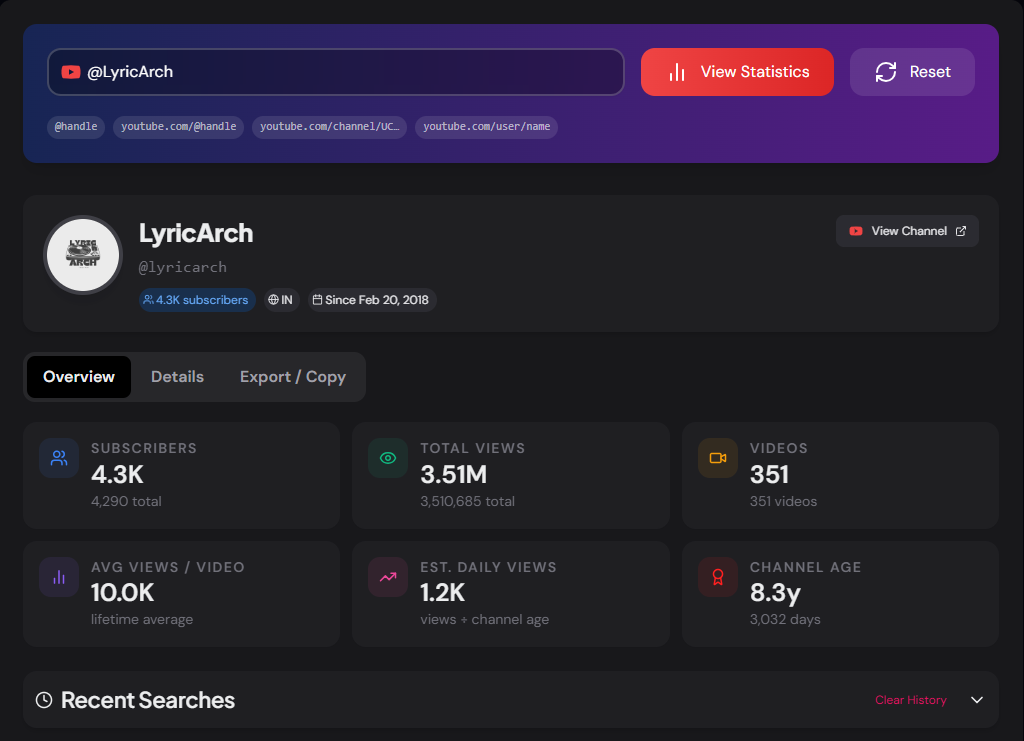
View subscribers, total views, video count, channel age, average views per video, estimated daily views, and more. Export as .txt or copy to clipboard.
What is the YouTube Channel Statistics Viewer?
The YouTube Channel Statistics Viewer is a free tool that displays comprehensive statistics for any public YouTube channel. Paste a channel URL or @handle and instantly see subscribers, total views, video count, channel age, average views per video, estimated daily views, and full channel details — all pulled live from the YouTube Data API.
Unlike YouTube's own channel page, which shows only subscriber counts and video lists, this tool surfaces derived metrics — such as average views per video and estimated daily view rate — that give a much more complete picture of how a channel is actually performing. All statistics can be copied to clipboard or downloaded as a formatted .txt file in one click.
How to Use the YouTube Channel Statistics Viewer
- 1Enter the Channel URL or Handle:
Paste any YouTube channel URL (e.g.
youtube.com/@MrBeast) or a bare @handle, then click "View Statistics". - 2Browse the Statistics:
The Overview tab shows six stat cards with subscribers, total views, video count, average views per video, estimated daily views, and channel age. The Details tab lists all values in a clean table alongside the channel ID, handle, country, and description.
- 3Export the Data:
Switch to the Export / Copy tab to preview a formatted text report and either copy it to clipboard or download it as a .txt file — useful for reports, spreadsheets, or keeping a record.
What Each Statistic Means
Pro Tips for Channel Research
Compare Competitor Channels
Look at Avg Views/Video and Est. Daily Views rather than raw subscriber counts. A channel with 500K subscribers but 10M avg views per video is outperforming one with 2M subscribers and 200K avg views.
Factor in Channel Age
A 6-month-old channel with 100K subscribers is growing much faster than a 10-year-old channel with the same count. Always read subscriber and view counts alongside the channel age to judge momentum accurately.
Build a Benchmark File
Download the .txt stats for 5–10 channels in your niche and combine them in a spreadsheet. This gives you a concrete benchmark to measure your own channel against over time.
Real-World Applications
Creator Research
Research channels in your niche before starting your own — understand what growth looks like at different stages and how much content is typically needed to hit certain subscriber milestones.
Brand Partnerships
Brands evaluating YouTube influencers for sponsorship deals can use this tool to verify claimed subscriber counts, check total reach, and assess whether view rates justify the quoted partnership fee.
Academic Research
Researchers studying media, platform growth, or creator economies can quickly collect baseline channel statistics for any public channel without needing API access or authentication.
Related YouTube Tools
YouTube Channel ID Finder
Find the channel ID, handle, and API snippets for any YouTube channel.
YouTube Profile Picture Downloader
Download the channel avatar in small, medium, and high quality.
YouTube Banner Downloader
Download channel art in all four device-specific sizes.
YouTube Metadata Extractor
Extract complete video metadata including title, description, tags, and stats.
The YouTube Channel Statistics Viewer gives you instant, accurate channel data for any public YouTube channel — no login, no YouTube Studio access, no API key required on your end. Paste the URL and get a complete statistics dashboard in seconds.
More YouTube Tools
YouTube Channel Comparison
Compare two YouTube channels side by side. Analyze subscribers, total views, video count, creation date, country, and other channel statistics.
YouTube Video Statistics Checker
Check YouTube video statistics including views, likes, comments, duration, publish date, tags, hashtags, and engagement metrics.
YouTube Channel ID Finder
Find and retrieve the unique Channel ID of any YouTube channel using a channel URL, custom URL, handle, or username.
YouTube Hashtag Extractor
Extract hashtags from any YouTube video or channel description. Find trending hashtags, copy them instantly, and improve your YouTube SEO strategy.
YouTube Banner Downloader
Download YouTube channel banners and channel art in high quality using a channel URL, handle, username, or channel ID.
YouTube Description Extractor
Extract and copy descriptions from any YouTube video, including links, hashtags, and complete description text.