HSL to RGB Converter
Convert HSL Color Codes to RGB with Real-time Preview
HSL Input
Color Preview
What is the HSL to RGB Converter?
The HSL to RGB Converter is a precision bridge between human-centric design and technical implementation. While **HSL** (Hue, Saturation, Lightness) is the most intuitive way for designers to "think" about color—picking a shade and then adjusting its vibrancy and brightness—**RGB** is the fundamental language of digital screens.
This advanced utility allows web developers, digital artists, and UI designers to translate creative HSL combinations into accurate Red, Green, and Blue values. Whether you are building a dynamic CSS theme or matching colors for a digital painting, this tool ensures your visual intent is perfectly preserved in the final technical output.
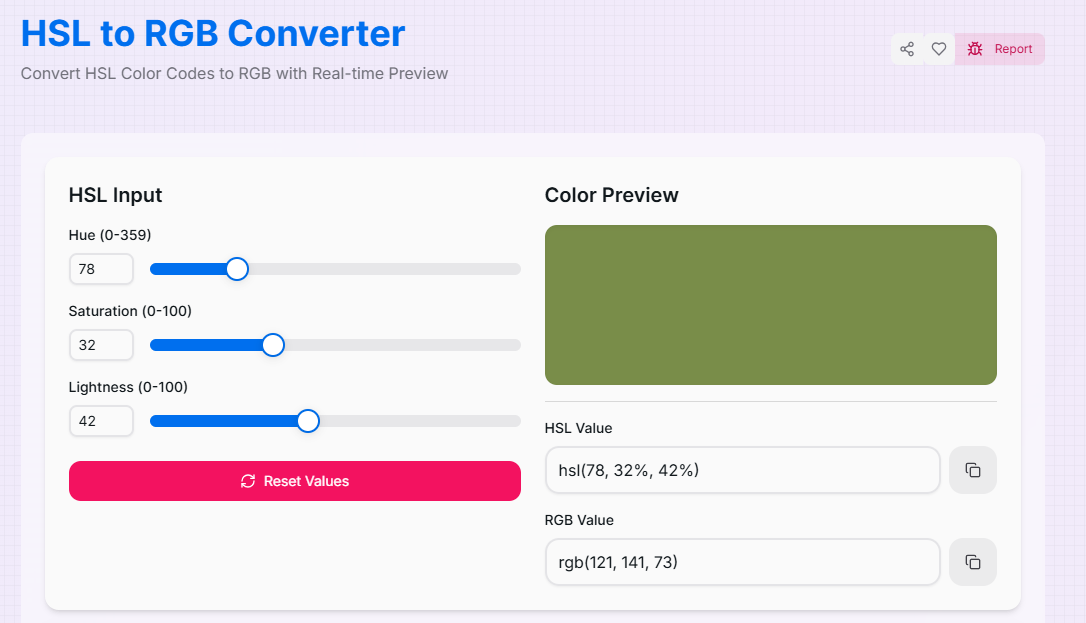
How to Use the HSL to RGB Converter?
- 1Select Your Hue (H):
Adjust the Hue slider (0-359°) to pick your base color from the 360-degree color wheel. This defines the core color tint (Red, Green, Blue, etc.).
- 2Set Saturation & Lightness:
Use the Saturation slider to control intensity (0% is gray, 100% is pure color) and the Lightness slider to determine brightness.
- 3Verify Real-Time Result:
Watch the Live Preview update instantly. The tool calculates the Red, Green, and Blue channels mathematically as you modify the HSL inputs.
- 4Copy RGB Values:
Use the Copy icon to grab your results. Click the Reset button () to quickly clear your work and start a new conversion.
Key Features for Professionals
Pro Tips for Palette Control
Web States
To create hover states in CSS, keep Hue and Saturation constant and only adjust the Lightness slider up or down.
Grayscale
Need a perfect gray? Set Saturation to 0%. Then use Lightness to go from pure Black (0%) to pure White (100%).
Harmony
To find "matching" colors, keep Saturation and Lightness the same while only moving the Hue slider in 30° increments.
Real-World Applications
Web Development
Quickly converting HSL logic from a style guide into standard RGB for CSS variables or Canvas drawing APIs.
Accessibility
Fine-tuning lightness to ensure text-on-background contrast meets WCAG standards without changing the base hue.
UI/UX Consistency
Ensuring brand consistency by converting between models when assets are shared across different digital design platforms.
Stop fighting with complicated color math. Whether you are a professional developer working on high-traffic apps or a designer building your first brand kit, our HSL to RGB Converter provides the accuracy and speed you need. Try it out today and streamline your color management workflow!
More Color Tools
RGB to HSL Converter
Convert RGB Color Codes to HSL with Real-time Preview.
CMYK to RGB Converter
Convert CMYK Color Codes to RGB with Real-time Preview.
HSL to HEX Converter
Convert HSL Color Codes to Hex with Real-time Preview.
HSV to RGB Converter
Convert HSV Color Codes to RGB with Real-time Preview.
RGB to CMYK Converter
Convert RGB Color Codes to CMYK with Real-time Preview.
RGB to HSV Converter
Convert RGB Color Codes to HSV with Real-time Preview.