RGB to HSV Converter
Convert RGB Color Codes to HSV with Real-time Preview
RGB Input
Color Preview
What is the RGB to HSV Converter?
The RGB to HSV Converter is a specialized tool designed to translate the language of hardware into the language of human perception. While screens use RGB (Red, Green, Blue) to display colors, artists and designers often prefer HSV (Hue, Saturation, Value) because it describes colors in a way that aligns with how we actually see them.
This advanced utility allows web developers, digital artists, and UI designers to easily convert standard RGB values into their HSV equivalents. By converting these values, you gain better control over color properties like intensity and brightness, which is essential for sophisticated image processing, complex color management, and creating harmonious design systems.
How to Use the RGB to HSV Converter?
- 1Adjust RGB Channels:
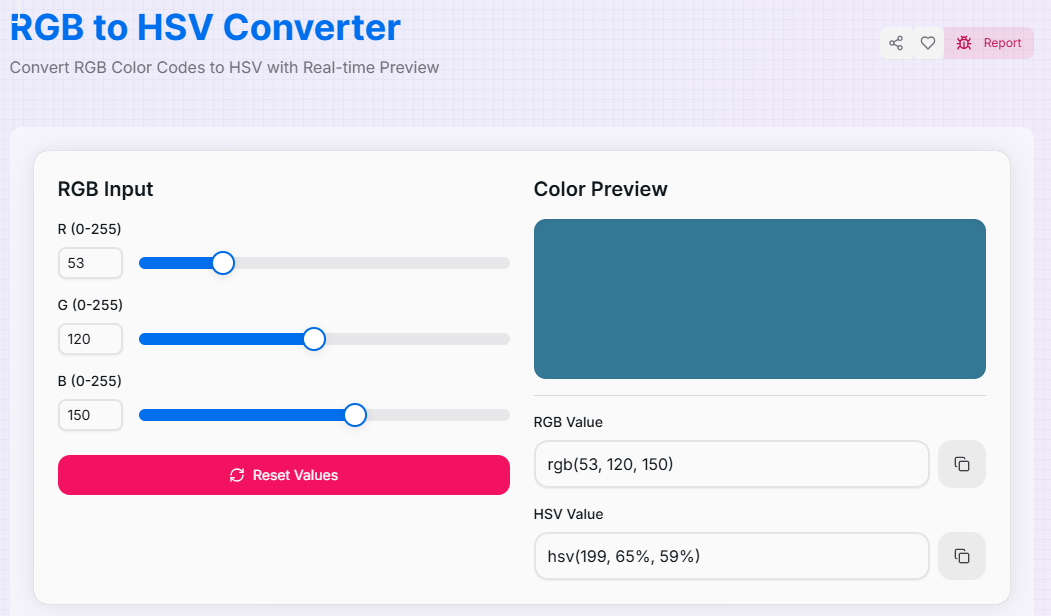
Use the Red, Green, and Blue sliders (0-255) to mix your base color. You can see the color evolve in the preview box as you shift each channel.
- 2Real-Time Observation:
As you modify the RGB values, the tool performs a live conversion. The resulting Hue (0-359°), Saturation (0-100%), and Value (0-100%) update instantly.
- 3Review HSV Values:
Check the Color Preview section to see how your RGB mix translates into the H, S, and V components—perfect for understanding color depth and brightness.
- 4Copy Results:
Use the Copy buttons to grab the RGB or HSV strings for your code. Click the Reset button () to start a new exploration.
Key Features
Pro Tips for Color Analysis
Hue Mapping
Convert your RGB to HSV to easily identify the dominant Hue. This makes it simple to find complementary colors by adding 180° to the Hue value.
Brightness Control
If your RGB color looks "muddy," check the Saturation in HSV. Lowering the RGB values equally will lower the HSV "Value" (Brightness).
UI States
Once you have the HSV values, keep H and S constant and only adjust "Value" to create perfect hover and active states for your buttons.
Real-World Applications
Digital Art
Converting color codes from reference photos into HSV to understand lighting and saturation levels for painting.
UI/UX Design
Standardizing brand colors into HSV to build mathematically consistent color ramps and accessible themes.
App Development
Using HSV values to programmatically adjust the brightness of a UI component based on user interaction or dark mode settings.
Ready to enhance your color workflow? Start using our RGB to HSV Converter now and experience the ease of precise color conversion with intuitive controls. Whether you are a professional developer working on complex color manipulation or a designer exploring new palettes, our tool provides the accuracy and functionality you need to succeed.
More Color Tools
HSV to RGB Converter
Convert HSV Color Codes to RGB with Real-time Preview.
CMYK to RGB Converter
Convert CMYK Color Codes to RGB with Real-time Preview.
HSL to RGB Converter
Convert HSL Color Codes to RGB with Real-time Preview.
HSV to Hex Converter
Convert HSV Color Codes to Hex with Real-time Preview.
RGB to CMYK Converter
Convert RGB Color Codes to CMYK with Real-time Preview.
RGB to HSL Converter
Convert RGB Color Codes to HSL with Real-time Preview.