HSL to Hex Converter
Convert HSL Color Codes to Hex with Real-time Preview
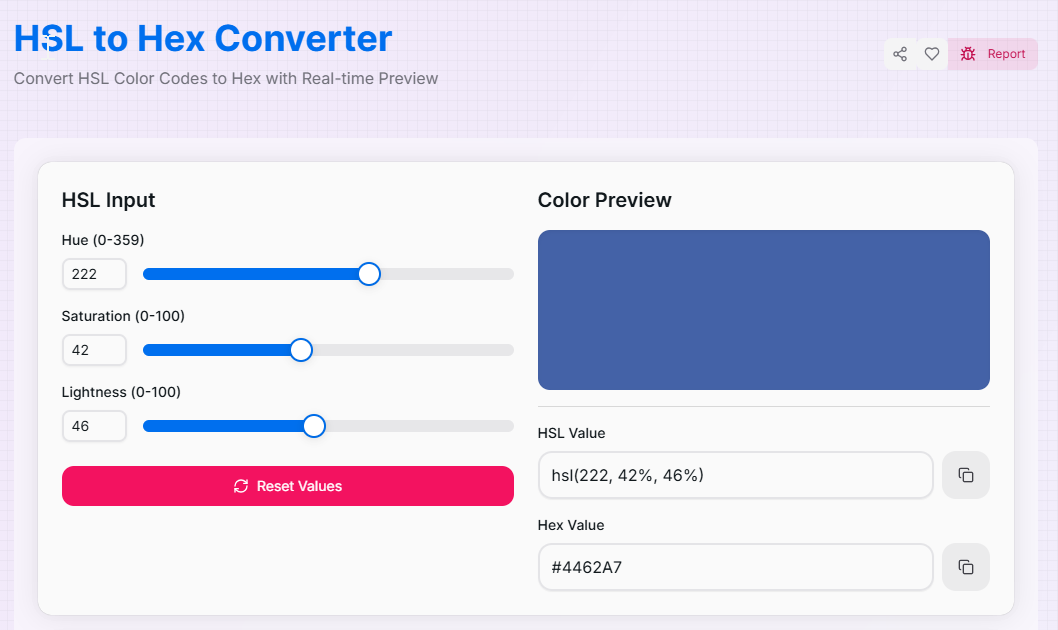
HSL Input
Color Preview
What is the HSL to Hex Converter?
The HSL to Hex Converter is a vital utility for the modern web workflow. While **HSL** (Hue, Saturation, Lightness) provides the most intuitive way for designers to manipulate color—organizing it by shade, intensity, and brightness—**Hexadecimal** remains the industry standard for concise, shareable color codes in CSS and digital brand assets.
This tool bridges the gap between artistic exploration and technical implementation. It allows you to fine-tune colors using HSL sliders and instantly receive the corresponding 6-digit Hex string. Whether you are building a complex UI system or defining brand guidelines, this converter ensures your visual choices are translated into developer-ready code with zero friction.
How to Use the HSL to Hex Converter?
- 1Set Your Hue:
Adjust the Hue slider (0-359°) to pick your base color from the spectrum. This defines the core color tint you are working with.
- 2Refine Saturation & Lightness:
Use the Saturation slider to set vibrancy and the Lightness slider to determine brightness. The hexadecimal value updates in real-time as you slide.
- 3Verify in Preview:
Check the Live Color Preview box to ensure the result matches your vision. The tool calculates the Hex string mathematically based on your HSL coordinates.
- 4Copy Hex Code:
Once satisfied, click the Copy icon to grab the Hex string. Use the Reset button () to start a new conversion immediately.
Key Features for Professionals
Pro Tips for Color Mastery
UI States
Need a hover color? Keep Hue and Saturation constant and simply lower the Lightness slider by 5-10% to get a perfect darken effect.
Perfect Grays
To generate clean Hex codes for neutrals, set Saturation to 0%. Then, use Lightness to find anything from white to deep charcoal.
CSS Efficiency
Use Hex codes for static branding, but keep HSL values in your documentation to make future adjustments much faster for your design team.
Real-World Applications
Web Development
Quickly converting HSL colors from design mockups into compact Hex strings for standard CSS declarations.
Brand Consistency
Translating custom mixed HSL palettes into permanent Hex codes for official brand style guides and asset libraries.
UI Prototyping
Adjusting lightness and saturation to find the perfect accessible color and then exporting the result as a Hex code for Figma.
Ready to take full control of your color palette? Start using our HSL to Hex Converter now and bridge the gap between creative intuition and technical precision. Whether you are building complex web apps or simple landing pages, our tool provides the accuracy you need to make your designs shine.
More Color Tools
HSL to RGB Converter
Convert HSL Color Codes to RGB with Real-time Preview.
HSV to Hex Converter
Convert HSV Color Codes to Hex with Real-time Preview.
RGB to HSL Converter
Convert RGB Color Codes to HSL with Real-time Preview.
RGBA to Hex Converter
Convert RGBA Color Codes to Hex with Real-time Preview.
Hex to RGBA Converter
Convert Hex color codes to RGBA format quickly.
CMYK to RGB Converter
Convert CMYK Color Codes to RGB with Real-time Preview.