HSV to Hex Converter
Convert HSV Color Codes to Hex with Real-time Preview
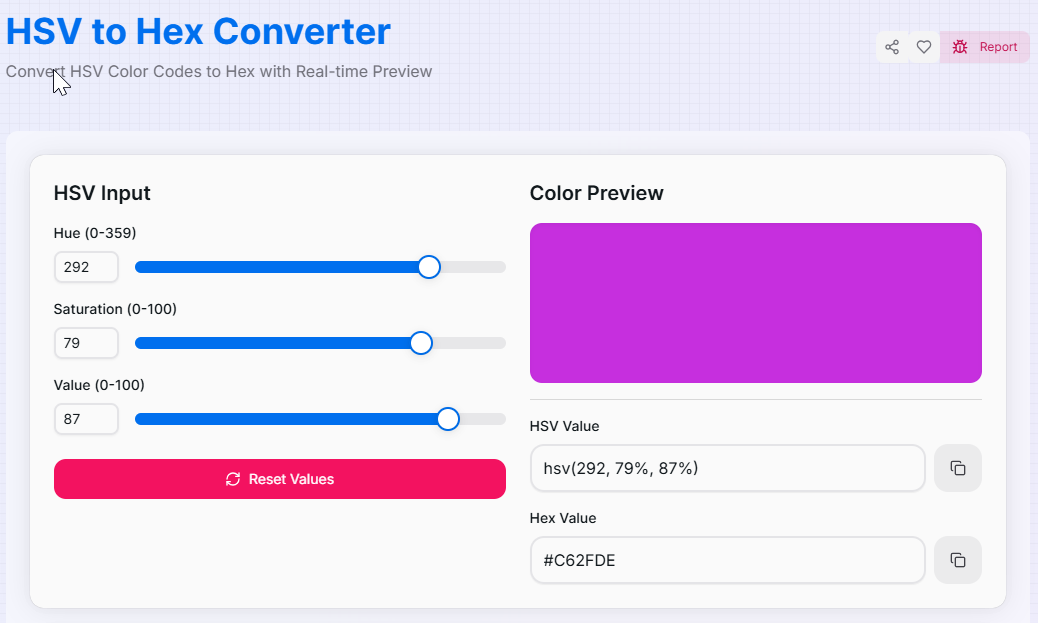
HSV Input
Color Preview
What is the HSV to Hex Converter?
The HSV to Hex Converter is a powerful bridge between artistic intuition and digital implementation. While **HSV** (Hue, Saturation, Value) is the most natural way for humans to navigate the color space—defining a color by its shade, vibrancy, and brightness—**Hexadecimal** is the universal language of web development and digital design.
This advanced utility allows you to fine-tune your visual choices using a human-friendly model and instantly receive the precise 6-digit code required for CSS, brand assets, and UI components. Whether you are creating a cohesive color scheme for a web app or exploring shadows and highlights for digital art, this tool transforms visual inspiration into technical data.
How to Use the HSV to Hex Converter?
- 1Define the Hue:
Adjust the Hue slider (0-359°) to select your base tint from the color wheel. This determines the primary shade (red, green, blue, etc.).
- 2Set Vibrancy and Brightness:
Use the Saturation slider to set color intensity and the Value slider to control brightness. The Hex code re-calculates instantly with every move.
- 3Monitor Live Preview:
Watch the Visual Preview box update in real-time. This provides immediate feedback so you can see exactly how the color looks on screen.
- 4Export Hex Result:
Click the Copy icon to grab the Hex string for your clipboard. Use the Reset button () to clear all values and start again.
Key Features for Designers
Pro Tips for Color Precision
Shadow Mapping
To find the perfect shadow color for a UI element, keep the Hue and Saturation constant and simply lower the Value slider by 10-20%.
Perfect Neutrals
Need a clean grayscale Hex code? Set Saturation to 0%. Then, use the Value slider to navigate from pure black to pure white.
Brand Sync
Document both HSL/HSV and Hex in your style guides. Use the Hex for code, but use the HSV values to explain the "feel" of the brand.
Real-World Applications
UI Development
Quickly converting HSV-based color logic from design mockups into concise Hex strings for standard CSS styles.
Style Guides
Ensuring brand consistency by translating custom mixed HSV palettes into permanent Hex codes for official documentation.
Accessibility
Adjusting brightness (Value) to find a high-contrast version of your brand color that meets web accessibility standards.
Ready to bridge the gap between creative intuition and technical precision? Start using our HSV to Hex Converter now and take full control of your digital palette. Whether you are building complex web applications or refining your personal brand, our tool provides the accuracy you need to make your designs shine.
More Color Tools
HSL to HEX Converter
Convert HSL Color Codes to Hex with Real-time Preview.
HSV to RGB Converter
Convert HSV Color Codes to RGB with Real-time Preview.
RGB to HSV Converter
Convert RGB Color Codes to HSV with Real-time Preview.
RGBA to Hex Converter
Convert RGBA Color Codes to Hex with Real-time Preview.
Hex to RGBA Converter
Convert Hex color codes to RGBA format quickly.
CMYK to RGB Converter
Convert CMYK Color Codes to RGB with Real-time Preview.