Image Color Picker
Effortlessly extract and capture colors from any image
What is the Image Color Picker?
Think of the Image Color Picker as a digital pipette for your screen. It is a powerful design instrument that allows you to upload any image and extract exact color data with surgical precision. It transforms visual inspiration into usable technical data instantly.
Whether you are a developer matching a UI component to a brand asset, a designer building a cohesive palette, or a color enthusiast analyzing a sunset, this tool bridges the gap between what you see and what you code. From individual pixel selection to automatic dominant color extraction, it provides the accurate HEX, RGB, and HSL values you need.
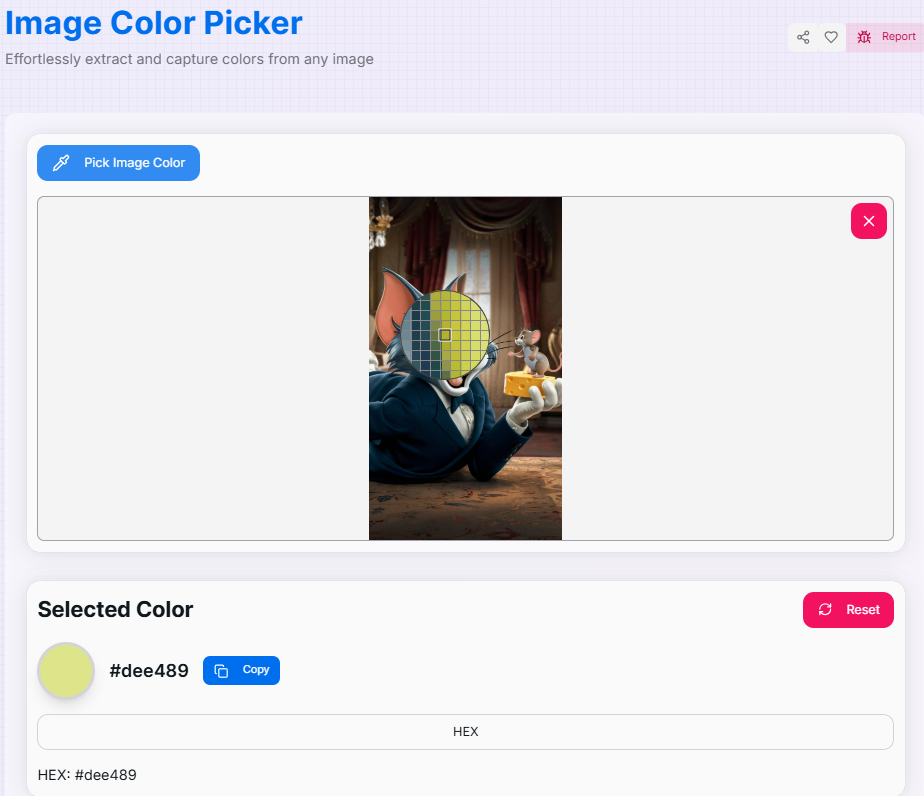
How to Use the Image Color Picker?
- 1Upload Your Image:
Click the upload area or simply drag and drop your file to load the image onto the canvas. High-resolution images are supported for maximum detail.
- 2Pick and Extract:Activate Eyedropper:Click the "Pick Image Color" button and hover over the image to select a specific pixel with pinpoint accuracy.
- 3Format & Analysis:
View the selected color in HEX, RGB, or HSL formats. You can also explore the Dominant Colors section to see the primary palette of the entire image.
- 4Copy and History:
Click Copy to send the value to your clipboard. Use the Color History () section to revisit previously picked shades.
Key Features for Designers
Pro Tips & Best Practices
Precision Zoom
Zoom into your browser if you're struggling to pick a tiny detail; the eyedropper respects the rendered pixel coordinates perfectly.
Harmonize
Use the Dominant Colors list to create backgrounds and accents that are guaranteed to match your hero imagery.
Context Check
Always test your picked colors in both light and dark backgrounds to ensure text legibility and accessibility compliance.
Real-World Applications
UI Development
Extracting exact color codes from design mockups or logos to implement perfectly in CSS or Tailwind themes.
Visual Analysis
Analyzing photographs to understand lighting composition or finding the average color temperature of a scene.
Brand Consistency
Ensuring marketing materials match established brand guidelines by verifying color values directly from assets.
The Image Color Picker is an essential asset for anyone working with digital visuals. By combining ease of use with professional-grade accuracy, you can build your dream palettes and ensure design consistency with absolute confidence. Start picking your colors today!
Related Tools
Image Color Extractor
Effortlessly extract dominant colors from images and create stunning color palettes for your projects.
Image Color Picker Tool
Extract colors from any image using our Image Color Picker. Ideal for designers to quickly generate HEX, RGB, and HSL palettes.
Color Converter
Convert colors between HEX, RGB, HSL, HSV, and RGBA formats with advanced features.
Color Mixer
Mix colors, generate shades, and explore different color formats with advanced features.
Color Wheel
Visualize colors and find perfect combinations using the color wheel.
Tailwind CSS Color Palette
Convert TailWind CSS to Hex, Generate TailWind Colors.