SVG Pattern Generator
Create unique, repeatable vector patterns for web backgrounds, print designs, and digital art with customizable options
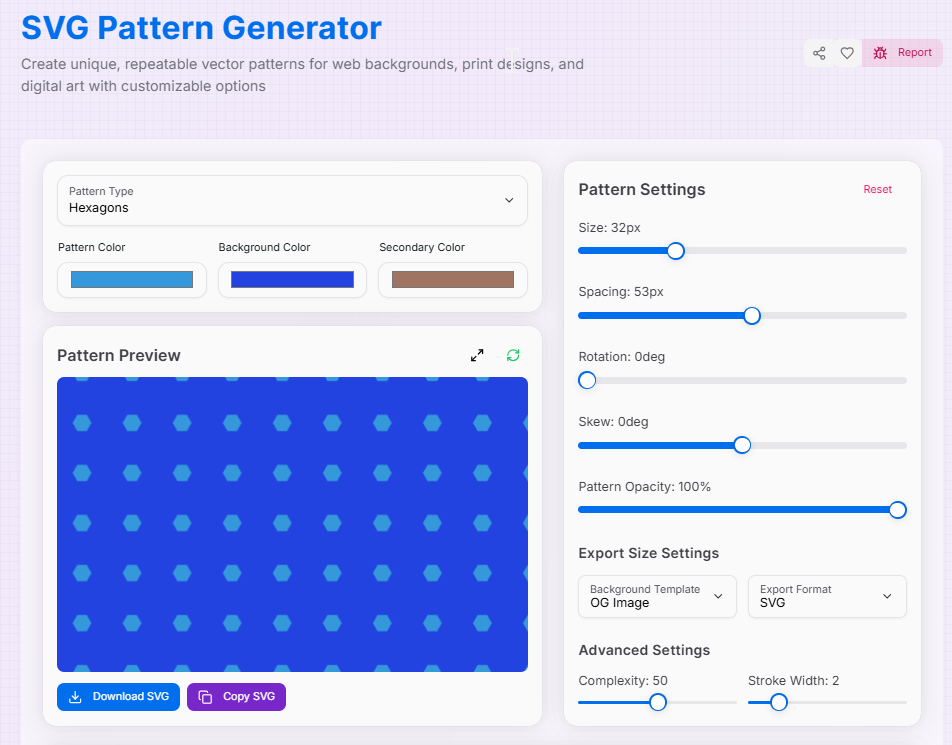
Pattern Preview
Pattern Settings
Export Size Settings
Advanced Settings
What is the SVG Pattern Generator?
The SVG pattern generator is a powerful and versatile tool designed to create unique, repeated vector patterns for various design purposes. Whether you are a web designer, graphic artist, or someone is looking to add visual interest to your projects, this device easily provides an introspection interface to craft the custom, scalable vector graphics.
With a wide range of adjustable parameters and real-time previews, you can fix your patterns to fully fit your design needs. The generator offers options for different patterns, color adaptation and even custom image uploads, which allows for versatile applications in web design, digital art, print material and more.
How to Use the SVG Pattern Generator?
- 1Choose a pattern type:
Select a base pattern from the dropdown, upload a custom image, or click "Randomize" for new ideas.
- 2Adjust pattern properties:Basic Adjustments:Control the size, spacing, rotation, and opacity.Advanced Details:Modify complexity and stroke width for finer control.
- 3Select your colors:
Use the color pickers to choose colors for the pattern elements and the background.
- 4Export your design:
Set your export dimensions, choose SVG or PNG, and download the file or copy the SVG code.
Key Features
Use Cases
Web Design
Create engaging background patterns for websites, landing pages, and web applications that add visual depth without overwhelming content.
Digital Art
Generate unique textures and backgrounds for digital illustrations, photo compositions, and creative projects that stand out.
Print Material
Design patterns for business cards, brochures, packaging, and other print materials with scalable vector graphics.
UI Elements
Create decorative backgrounds for cards, modals, sections, and other interface components that enhance user experience.
Brand Identity
Develop consistent pattern systems for brand materials that can be applied across all marketing channels and touchpoints.
Social Media
Generate eye-catching backgrounds for social media posts, stories, and graphics that capture attention in crowded feeds.
Creative Tips and Tricks
- Combine different pattern types: Use similar settings with different pattern types to create layered, complex designs that add depth and visual interest.
- Experiment with opacity: Use high opacity for bold, striking patterns, or low opacity for subtle background textures that complement your content.
- Try extreme values: Experiment with extreme size and spacing values to create unique, abstract patterns that break conventional design rules.
- Rotate for variety: Try rotating your pattern at different angles to find interesting orientations that create dynamic visual flow.
- Custom image masking: Use custom image uploads with geometric patterns for creative masking effects that transform ordinary photos.
- Layer with solid colors: Combine patterns with solid color shapes in your designs for contrast and visual interest that guides the eye.
- Animate with code: Use the SVG code to create animated patterns in web projects using CSS or JavaScript for engaging user experiences.
- Adjust complexity and stroke: Experiment with the complexity and stroke width to achieve different artistic styles from minimal to intricate.
Ready to transform your designs with captivating patterns? Our SVG Pattern Generator offers endless possibilities for your creative projects. Whether you're designing for web, print, or digital media, this tool provides the flexibility and power you need to bring your ideas to life. Start experimenting with patterns now and take your designs to the next level!
More Image Tools
SVG Blob Generator
Generate organic, customizable SVG blob shapes instantly. Perfect for modern web, presentations, and graphics—fully scalable, lightweight, and tailored to your style.
PNG to SVG Converter
Convert PNG images to SVG format.
SVG to PNG Converter
Easily convert your SVG files to high-quality PNG images with our fast and reliable SVG to PNG Converter.
Image Average Color Finder
Analyze images to find their average and dominant colors effortlessly. Perfect for designers, artists, and anyone looking to create cohesive color palettes for their projects.
Image Color Extractor Tool
Effortlessly extract dominant colors from images and create stunning color palettes for your projects.
Image Cropper
Crop, rotate, and adjust your images with precision for web and mobile.