SVG Blob Generator
Generate organic, customizable SVG blob shapes instantly. Perfect for modern web, presentations, and graphics—fully scalable, lightweight, and tailored to your style.
Shape Controls
Wave Controls
What is the SVG Blob Generator?
The SVG Blob generator is a powerful and intuitive device designed to create unique, organic drop shapes for your design projects. These smooth, flowing shapes add a modern and playful aesthetics for websites, presentations and graphic designs. With our generator, you can create a custom SVG blob which are fully scalable, light and ready to use in any digital project.
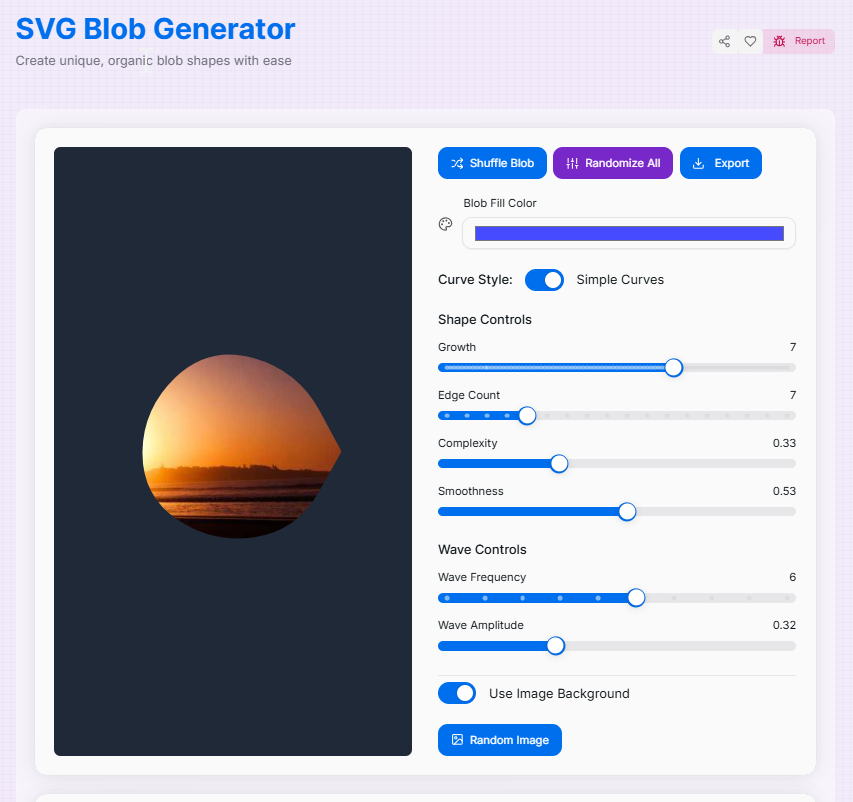
Unlike static design elements, our drop generator gives you complete control over every aspect of the presence of your drop. Adjust parameters such as growth, edge count, complexity and lubrication to create anything from simple, round shapes to complex, uncontrolled forms. You can also fill your drops with images for creative masking effects or use solid colors for clean, minimal designs.
How to Use the SVG Blob Generator?
- 1Generate a blob shape:
Start with the default shape or click "Shuffle Blob" or "Randomize All" to generate new ones.
- 2Customize the shape:Basic Properties:Adjust Growth, Edge Count, and Complexity sliders.Advanced Properties:Fine-tune Smoothness, Wave Frequency, and Amplitude.
- 3Set the appearance:
Choose a solid fill color with the color picker or toggle "Use Image Background" to fill the blob with an image.
- 4Export your design:
When you're happy with the result, save it as an SVG or PNG file, or copy the SVG code to your clipboard.
Key Features
Use Cases
Website Backgrounds
Create dynamic, organic background elements for hero sections, landing pages, and website headers that add visual interest without overwhelming content.
Graphic Design
Add modern, playful shapes to posters, social media graphics, presentations, and marketing materials for a contemporary aesthetic.
Brand Identity
Develop unique brand elements and visual motifs that can be consistently applied across all brand touchpoints and marketing channels.
UI Elements
Design custom buttons, badges, avatars, and decorative elements that break away from traditional geometric shapes for unique interfaces.
Image Frames
Use blob shapes as creative image masks to display photos and illustrations in unique, eye-catching ways that stand out from standard rectangles.
Animations
Generate multiple blob variations to create smooth morphing animations for websites and digital experiences that capture attention.
Creative Tips and Tricks
- For smooth, cloud-like blobs: Use higher edge counts (10-15) with high smoothness (0.7-1.0) and low complexity (0.2-0.4) to create soft, organic shapes perfect for backgrounds.
- For abstract, angular shapes: Try lower edge counts (3-6) with low smoothness (0-0.3) and high complexity (0.7-1.0) for bold, geometric-inspired designs.
- For subtle background elements: Create large, gentle blobs with high growth (8-10) and moderate smoothness (0.5-0.7) that complement without distracting from content.
- For dynamic, flowing shapes: Increase wave frequency (6-10) and amplitude (0.6-0.9) with moderate edge count (8-12) to create energetic, movement-filled designs.
- For consistent brand elements: Save your favorite parameter combinations to recreate similar blob styles across projects and maintain visual consistency.
- For layered designs: Export multiple blobs with slight variations and stack them with different opacities in your design software for depth and dimension.
- For animated websites: Export several blob variations and use CSS or JavaScript to morph between them for engaging, dynamic user experiences.
- For creative image displays: Use the image background feature with photos to create unique, organic image frames that break away from traditional rectangular layouts.
Ready to add organic, fluid shapes to your design toolkit? Our SVG Blob Generator makes it easy to create custom, scalable vector graphics that can enhance any project. Whether you're looking for subtle background elements or bold, eye-catching shapes, the possibilities are endless. Start experimenting with different parameters to discover unique blob designs that perfectly complement your creative vision!
More Image Tools
SVG Pattern Generator
Create unique, repeatable vector patterns for web backgrounds, print designs, and digital art with customizable options.
PNG to SVG Converter
Convert PNG images to SVG format.
SVG to PNG Converter
Easily convert your SVG files to high-quality PNG images with our fast and reliable SVG to PNG Converter.
Image Average Color Finder
Analyze images to find their average and dominant colors effortlessly. Perfect for designers, artists, and anyone looking to create cohesive color palettes for their projects.
Image Color Picker Tool
Extract colors from any image using our Image Color Picker. Ideal for designers to quickly generate HEX, RGB, and HSL palettes.
Image Cropper
Crop, rotate, and adjust your images with precision for web and mobile.