Screen Resolution Checker
Check and analyze your screen resolution,Browser Resolution, color depth, refresh rate, pixel density, and HDR capabilities with our Advanced Screen Resolution Checker. Perfect for display analysis.
What is the Screen Resolution Checker?
The Screen Resolution Checker is a sophisticated diagnostic utility designed to provide a comprehensive profile of your display hardware and software environment. It acts as a digital magnifying glass, uncovering the precise technical specifications of your screen that govern how content is rendered and displayed.
Invaluable for web developers, UI/UX designers, and hardware enthusiasts, this tool bridges the gap between raw hardware capabilities and software interpretation. From identifying physical pixel density and logical resolutions to analyzing color gamut and HDR support, it provides the detailed data required to optimize digital experiences for every possible viewport.
How to Use the Screen Resolution Checker?
- 1Automatic Detection:
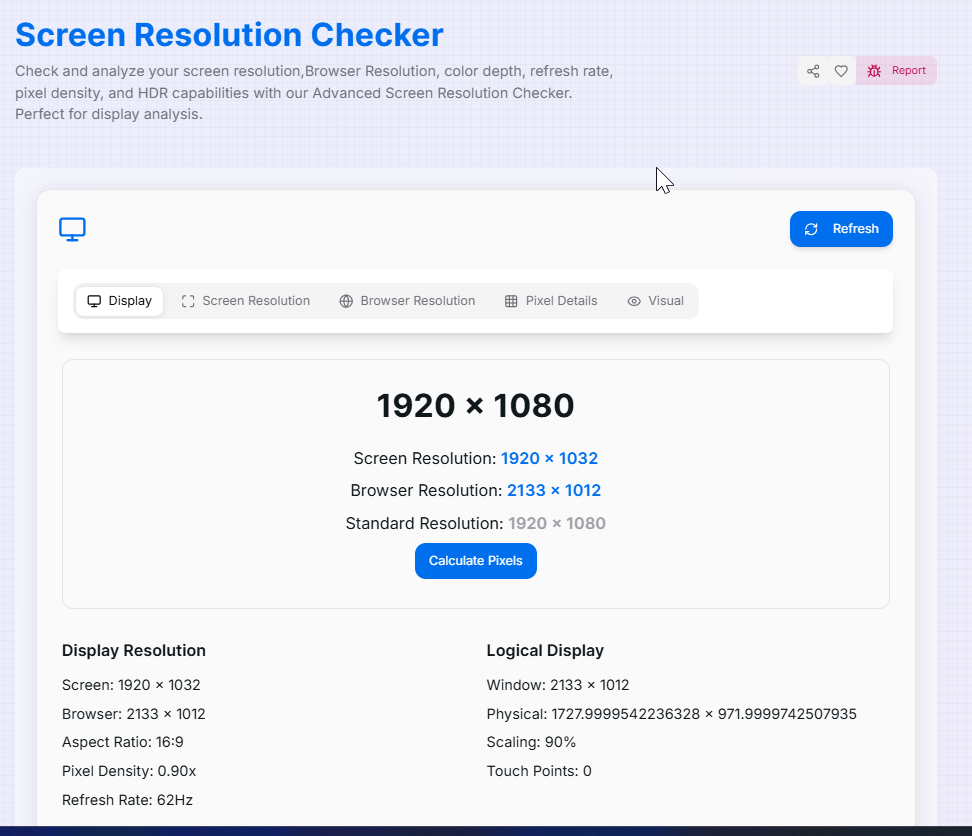
Simply open the tool. Our diagnostic engine automatically analyzes your device and browser environment to fetch real-time display data without any manual input.
- 2Navigate the Data Tabs:
Use the tabbed interface to toggle between Display Specs, Screen Resolution, Browser Viewport, and Pixel Details for organized technical viewing.
- 3Analyze Visual Ratios:
Observe the visual representation of your aspect ratio and monitor properties. Use the Refresh () button if you resize your window or connect an external display.
- 4Copy or Share:
Click the Copy button to grab the full technical report for your clipboard, or use the Share button to send your specs to social media or support teams.
Key Features for Tech Enthusiasts
Pro Tips for Display Optimization
Logical Scaling
If your high-res 4K screen shows a smaller resolution, check the Pixel Ratio. OS scaling (like 200%) changes the logical width for better readability.
Gamut Check
Designers should check the Color Depth. High-end displays support 10-bit color, allowing for smoother gradients without banding issues.
Responsive Test
Use the Browser Resolution tab while resizing your window to find the exact breakpoints needed for your CSS media queries.
Real-World Applications
Web Development
Finding exact device pixel ratios to ensure high-resolution "Retina" images are served correctly to the user.
UX Audits
Identifying specific screen constraints to ensure critical UI elements aren't hidden by OS taskbars or notches.
Tech Support
Providing a complete display technical profile when reporting bugs or hardware performance issues to IT teams.
Discover the full potential of your hardware today. Whether you are a designer perfecting your media queries, a developer troubleshooting performance, or a tech enthusiast curious about your display metrics, our Screen Resolution Checker provides the clarity you need. Start exploring your screen's hidden capabilities now!
Related Tools
Advance Password Generator
Generate secure and customizable passwords quickly and effortlessly.
BarCode Generator
Generate custom barcodes.
List Randomizer
Powerful tool designed to shuffle and manipulate lists of items.
QR Code Generator
Create customized QR codes with advanced styling options.
Unit Converter
Quickly and accurately convert between various units of measurement.
DMARC Checker
Check and validate DMARC records, analyze email authentication policies, verify SPF and DKIM alignment, and improve domain email security.