DMARC Checker
Validate DMARC records, analyze policy in plain English, check alignment, view related authentication status, and get a security score
Enter a domain to check its DMARC record
See the policy in plain English, parse every tag, check SPF & DKIM alignment, view related authentication status, and get a security score.
What is the DMARC Checker?
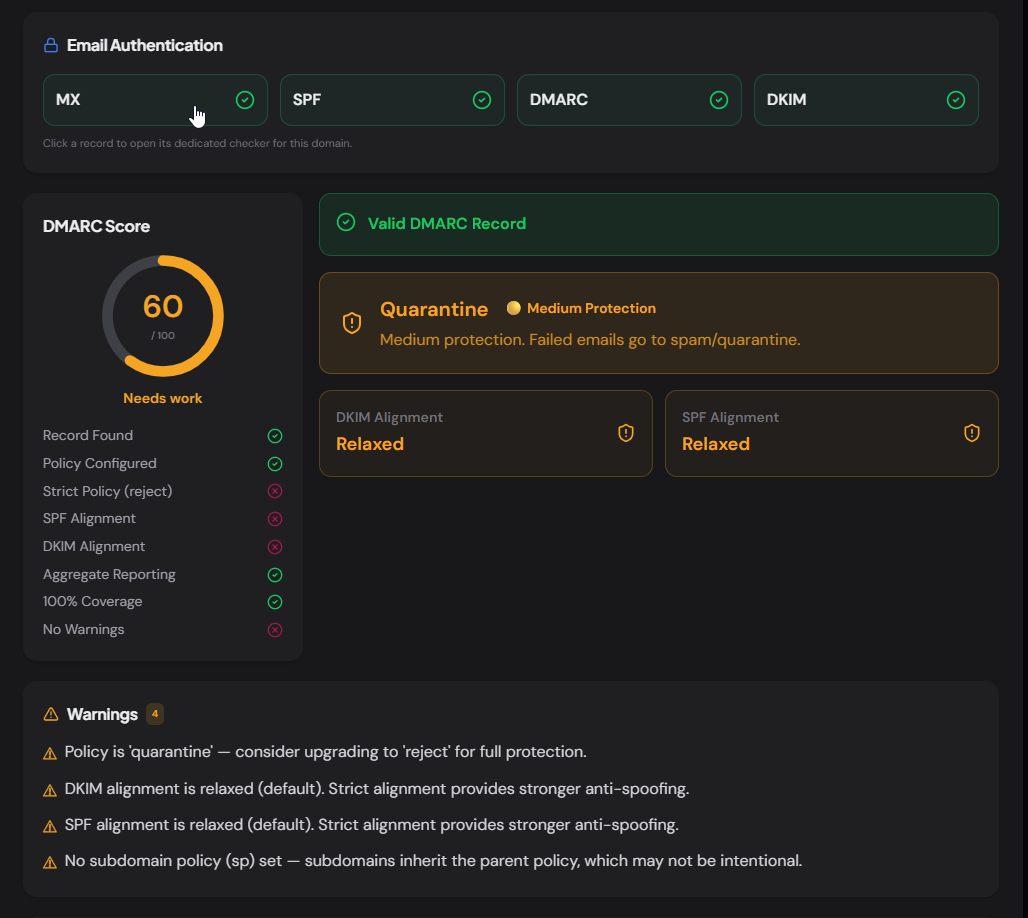
The DMARC Checker is a free tool that retrieves, validates, and explains the DMARC (Domain-based Message Authentication, Reporting & Conformance) record of any public domain. Instead of showing a raw TXT string, it translates every tag into plain English, evaluates the policy strength, checks SPF and DKIM alignment, surfaces configuration warnings, and produces a security score.
DMARC ties SPF and DKIM together with a policy that tells receiving mail servers what to do when authentication fails — reject the message, quarantine it, or do nothing. Without DMARC, a passing SPF or DKIM check alone doesn't prevent display-from spoofing. This tool shows you exactly how a domain's DMARC is configured and where it can be tightened.
How to Use the DMARC Checker
- 1Enter a Domain:
Type or paste any domain such as
contoso.comand click "Check DMARC". - 2Review the Authentication Overview:
The top card shows whether MX, SPF, DMARC, and DKIM records exist for the domain. Each label is clickable and opens the dedicated checker for that record type.
- 3Understand the Policy:
The policy badge shows Reject (strong), Quarantine (medium), or None (monitoring only) with a color-coded label and a plain-English explanation — no RFC reading required.
- 4Copy or Export:
Copy the raw record, or export the full parsed tag table as CSV or JSON for audit reports, change-management tickets, or compliance documentation.
Key Features
p=reject into "Reject — highest protection" with a color-coded badge: 🟢 Strong, 🟡 Medium, 🔴 Monitoring Only.adkim, aspf, rua, pct, etc.) is parsed into a three-column table with the tag, its value, and a plain-English explanation.adkim=s yourself.Pro Tips
Start with p=none
Deploy DMARC in monitoring mode first (p=none with rua reports). Analyze the reports to ensure all legitimate senders pass alignment, then escalate to p=quarantine and finally p=reject.
Enable rua Reports
Aggregate reports (rua) are XML files that show which IPs sent mail using your domain and whether they passed SPF/DKIM. Without them, DMARC is flying blind — you won't know what's failing until users complain.
Protect Subdomains
If you don't set sp=, subdomains inherit the parent policy. Attackers often spoof subdomains (e.g. hr.contoso.com) because many domains protect the root but forget the subs. Set sp=reject explicitly.
Real-World Applications
M365 / Google Admin
Verify your DMARC policy is enforcing, both alignments are correct, and aggregate reports are flowing to your monitoring platform before marketing adds a new ESP.
Vendor Risk Assessment
Check a vendor's DMARC before trusting email from their domain. A missing or p=none DMARC means anyone can impersonate them — a phishing risk to your organization.
Compliance Auditing
Many compliance frameworks (PCI DSS, NIST 800-177, BIMI) require DMARC at enforcement level. Export the parsed results as evidence for auditors.
DMARC Tags Reference
Every DMARC tag and what it controls — useful as a quick reference when reading or writing records.
vVersion — must be DMARC1
pPolicy — none, quarantine, or reject
spSubdomain policy — overrides p for subdomains
ruaAggregate report recipients (mailto: URIs)
rufFailure/forensic report recipients
adkimDKIM alignment — s (strict) or r (relaxed)
aspfSPF alignment — s (strict) or r (relaxed)
pctPercentage of messages the policy applies to (1–100)
foFailure options — when to generate reports (0, 1, d, s)
riReport interval in seconds (default 86400 = 24h)
Related Networking Tools
MX Record Lookup
Check mail servers, detect providers, and verify email routing configuration.
SPF Record Checker
Validate SPF records, count DNS lookups, parse mechanisms, and detect providers.
DNS Lookup
Query A, AAAA, CNAME, TXT, NS, and SOA records for any domain.
IP Address Lookup
Find geolocation, ASN, and host details for any IP address.
The DMARC Checker is the clearest, most thorough free DMARC audit tool available — it translates every tag into plain English, evaluates the policy and alignment, checks all related authentication records in one shot, flags misconfigurations, and scores the result. Whether you're rolling out DMARC for the first time, auditing a vendor, or preparing for a compliance review, enter a domain and get the full picture in seconds. No sign-up, no API key, no cost.
More Networking Tools
Email Authentication Checker
Complete email authentication audit with MX, SPF, DMARC, DKIM, TXT, NS, IPv6 checks, provider detection, security scoring, and actionable recommendations.
MX Record Lookup
Check mail servers, detect the email provider and security gateway, verify SPF/DMARC/DKIM, and get a DNS health score for any domain.
SPF Record Checker
Validate SPF records, count DNS lookups against the 10-lookup limit, parse mechanisms, detect providers, and get a security score.
DNS Propagation Checker
Check DNS propagation across global DNS resolvers for A, AAAA, CNAME, MX, TXT, NS, SOA, PTR, and CAA records with real-time propagation status.
TXT Record Lookup
Look up all TXT records for any domain, classify each record, detect 40+ connected services, check email authentication, and export results.
NS Lookup
Look up nameservers for any domain, detect the DNS provider, health-check each server, view glue records and SOA, and verify DNS configuration consistency.