SPF Record Checker
Validate SPF records, count DNS lookups, parse mechanisms, detect providers, and get a security score for any domain
Enter a domain to audit its SPF record
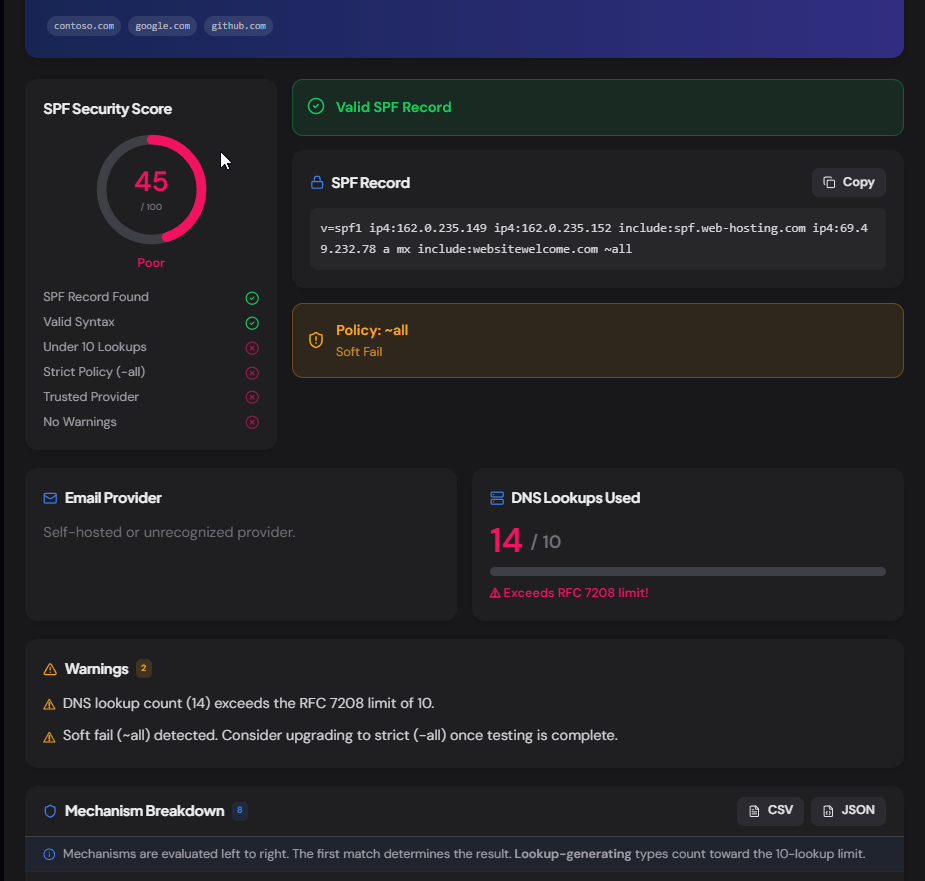
Validate syntax, parse every mechanism, count DNS lookups against the 10-lookup limit, detect providers, and get a security score — all in one check.
What is the SPF Record Checker?
The SPF Record Checker is a free tool that retrieves, validates, and audits the SPF (Sender Policy Framework) record of any public domain. It goes far beyond showing the raw TXT record — it parses every mechanism, recursively follows include: chains to count total DNS lookups against the RFC 7208 limit of 10, detects which email providers are authorized, evaluates the catch-all policy, and produces a security score.
SPF is one of three pillars of email authentication (alongside DKIM and DMARC). A misconfigured SPF record — too many lookups, a soft-fail policy, or a missing record — can cause legitimate mail to be rejected or allow spoofing. This tool catches those issues before they become delivery problems.
How to Use the SPF Record Checker
- 1Enter a Domain:
Type or paste any domain such as
contoso.comand click "Check SPF". URLs and email addresses work too — the domain is extracted automatically. - 2Review the Security Score:
A 0–100 score summarizes the overall SPF health at a glance — SPF found, valid syntax, lookup count, policy strictness, and provider recognition all factor in.
- 3Check DNS Lookup Count:
SPF is limited to 10 DNS lookups per evaluation (RFC 7208). The tool recursively resolves every
include:,a,mx, andredirectmechanism and shows the total, with the full include tree so you can see where lookups accumulate. - 4Copy or Export Results:
Copy the raw SPF record, or export the full mechanism breakdown as CSV or JSON for tickets, documentation, or change-management records.
Key Features
Pro Tips
Flatten Includes
If your lookup count is too high, consider replacing nested include: directives with their resolved IP ranges using ip4: and ip6: mechanisms. This is called "SPF flattening" and doesn't consume DNS lookups.
Test Before Enforcing
Start with ~all (soft fail) while auditing, then switch to -all (hard fail) once you're confident all legitimate senders are included. A hard fail on day one can block mail from services you forgot to add.
Pair with DMARC
SPF alone doesn't stop spoofing — attackers can use a different envelope domain. Pair SPF with DMARC (p=reject) so receivers enforce alignment between the visible "From:" address and the SPF-authenticated domain.
Real-World Applications
M365 / Google Workspace Admin
Verify your tenant's SPF record includes the right providers, hasn't exceeded the lookup limit after adding marketing platforms, and uses a strict policy.
Security Auditing
Check vendor or acquisition-target domains for missing or weak SPF records as part of a phishing-risk assessment or compliance review.
Deliverability Debugging
When marketing emails bounce with "SPF PermError", use the lookup tree to find which include chain pushed you over the 10-lookup limit, then flatten or remove the offender.
Common SPF Include Directives
These are the SPF include directives used by the most popular email providers and marketing platforms. If you see one of these in a domain's SPF record, you know which service sent the mail.
Microsoft 365
include:spf.protection.outlook.comGoogle Workspace
include:_spf.google.comZoho Mail
include:zoho.comAmazon SES
include:amazonses.comSendGrid
include:sendgrid.netMailchimp / Mandrill
include:mandrillapp.comMailgun
include:mailgun.orgProofpoint
include:pphosted.comMimecast
include:mimecast.comHubSpot
include:hubspot.netRelated Networking Tools
MX Record Lookup
Check mail servers, detect providers, and verify email authentication.
DMARC Checker
Inspect a domain's DMARC policy, alignment settings, and reporting config.
DNS Lookup
Query A, AAAA, CNAME, TXT, NS, and SOA records for any domain.
IP Address Lookup
Find geolocation, ASN, and host details for any IP address.
The SPF Record Checker is the most thorough free SPF audit tool available — it doesn't just show the raw record, it recursively resolves every include, counts lookups, flags misconfigurations, and scores the result. Whether you're an M365 admin adding a new marketing platform, a security analyst auditing a vendor, or a developer debugging bounce messages, enter a domain and get the full picture in seconds. No sign-up, no API key, no cost.
More Networking Tools
MX Record Lookup
Check mail servers, detect the email provider and security gateway, verify SPF/DMARC/DKIM, and get a DNS health score for any domain.
AAAA Record Lookup
Look up AAAA (IPv6) records, classify IPv6 address types, detect hosting and CDN providers, check reverse DNS, compare with IPv4, and export results.
DMARC Checker
Check and validate DMARC records, analyze email authentication policies, verify SPF and DKIM alignment, and improve domain email security.
A Record Lookup
Look up A records for any domain, view IPv4 addresses, TTL, geographic location, hosting provider, reverse DNS, and autonomous system (ASN) information.
DNS Propagation Checker
Check DNS propagation across global DNS resolvers for A, AAAA, CNAME, MX, TXT, NS, SOA, PTR, and CAA records with real-time propagation status.
Email Authentication Checker
Complete email authentication audit with MX, SPF, DMARC, DKIM, TXT, NS, IPv6 checks, provider detection, security scoring, and actionable recommendations.