NS Lookup
Look up nameservers for any domain, detect the DNS provider, health-check each server, view glue records and SOA, and verify consistency
Enter a domain to look up its nameservers
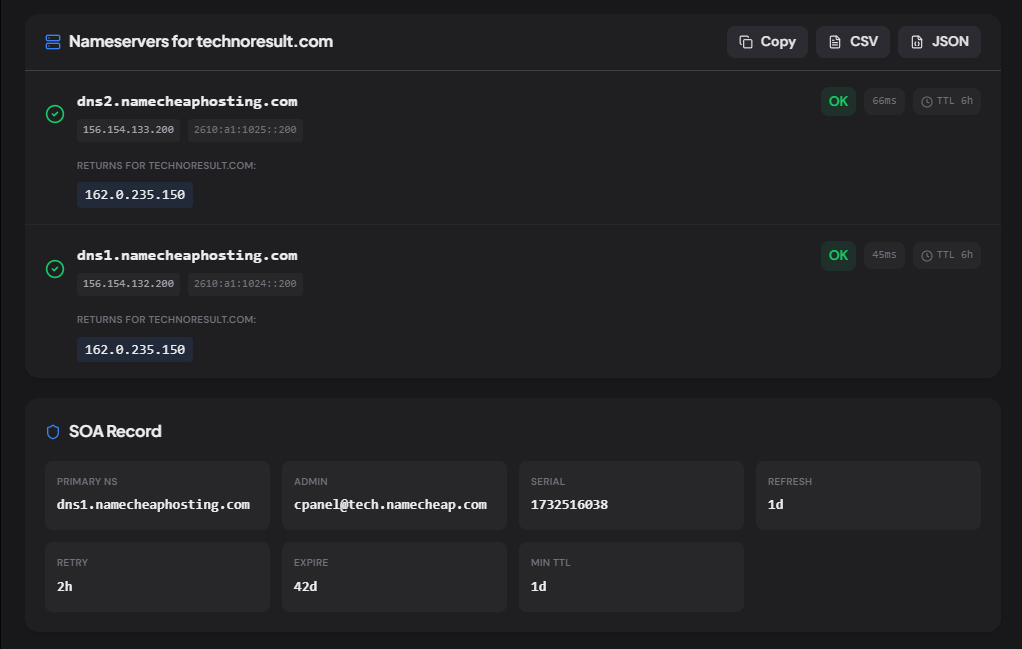
See every nameserver, their IPs, health status, response time, DNS provider, SOA record, and whether all servers are returning consistent answers.
What is the NS Lookup Tool?
The NS Lookup tool retrieves the nameserver (NS) records for any domain and goes well beyond listing hostnames. It resolves each nameserver's IPv4 and IPv6 addresses (glue records), health-checks every server by querying it directly, detects which DNS hosting provider or registrar runs the zone, fetches the SOA record, and verifies that all nameservers return consistent answers.
Nameservers are the backbone of DNS — they're the authoritative servers that answer queries for a domain. If one is down or out of sync, parts of the internet can't resolve the domain. This tool shows you the full picture at a glance.
How to Use the NS Lookup Tool
- 1Enter a Domain:
Type any domain and click "Lookup NS".
- 2Check Health Status:
Each nameserver is queried directly to verify it's responding. Green = healthy, red = down or unreachable, with response time in milliseconds.
- 3Identify Provider & Verify Consistency:
The tool detects the DNS provider (Cloudflare, Route 53, GoDaddy, etc.) and checks if all servers return the same answer for the domain's A record.
- 4Copy or Export:
Copy all results or export as CSV / JSON for documentation and change management.
Key Features
Pro Tips
Always Have ≥2
A single nameserver is a single point of failure. RFC 1034 recommends at least two. Most production domains use 2–4.
Check After Migration
After changing DNS providers, run this tool to verify the new nameservers are responding and the old ones have been removed — leftover NS records cause split-brain resolution.
Watch the Serial
The SOA serial number should increment with every zone change. If it hasn't changed after an update, the secondary NS may not have picked up the new records yet.
Real-World Applications
DNS Migration
Verify that new nameservers are live and healthy before removing the old delegation at the registrar.
Outage Diagnosis
When a domain goes down, the first thing to check is whether the nameservers are responding. This tool answers that in seconds.
Competitive Research
See which DNS provider a competitor uses — Cloudflare, Route 53, or registrar defaults — to understand their infrastructure choices.
Common DNS Hosting Providers
Cloudflare
*.ns.cloudflare.comAWS Route 53
*.awsdns-*.org/com/net/co.ukGoogle Cloud DNS
ns-cloud-*.googledomains.comAzure DNS
*.azure-dns.*GoDaddy
*.domaincontrol.comNamecheap
*.registrar-servers.comNetlify
dns*.p*.nsone.netVercel
*.vercel-dns.comRelated Networking Tools
MX Record Lookup
Check mail servers, detect providers, and verify email routing.
SPF Record Checker
Validate SPF records, count lookups, and detect providers.
DMARC Checker
Analyze DMARC policy, check alignment, and get a security score.
DNS Propagation Checker
Check DNS propagation across 20 global resolvers.
The NS Lookup tool goes far beyond listing nameserver hostnames — it health-checks each server, resolves their IPs, detects the DNS provider, fetches the SOA, and verifies consistency. Whether you're migrating DNS, diagnosing an outage, or researching a competitor's infrastructure, enter a domain and see the full picture in seconds. No sign-up, no API key, no cost.
More Networking Tools
MX Record Lookup
Check mail servers, detect the email provider and security gateway, verify SPF/DMARC/DKIM, and get a DNS health score for any domain.
A Record Lookup
Look up A records for any domain, view IPv4 addresses, TTL, geographic location, hosting provider, reverse DNS, and autonomous system (ASN) information.
AAAA Record Lookup
Look up AAAA (IPv6) records, classify IPv6 address types, detect hosting and CDN providers, check reverse DNS, compare with IPv4, and export results.
TXT Record Lookup
Look up all TXT records for any domain, classify each record, detect 40+ connected services, check email authentication, and export results.
CNAME Lookup
Look up CNAME records, follow the complete alias chain, detect CDN and hosting providers, resolve final destination records, and export results.
DNS Propagation Checker
Check DNS propagation across global DNS resolvers for A, AAAA, CNAME, MX, TXT, NS, SOA, PTR, and CAA records with real-time propagation status.