DNS Propagation Checker
Check DNS propagation across 20 global resolvers for A, AAAA, CNAME, MX, TXT, NS, SOA, PTR, and CAA records
Enter a domain to check DNS propagation
See how your DNS changes are propagating across 20 resolvers worldwide. Supports A, AAAA, CNAME, MX, TXT, NS, SOA, PTR, and CAA records.
What is the DNS Propagation Checker?
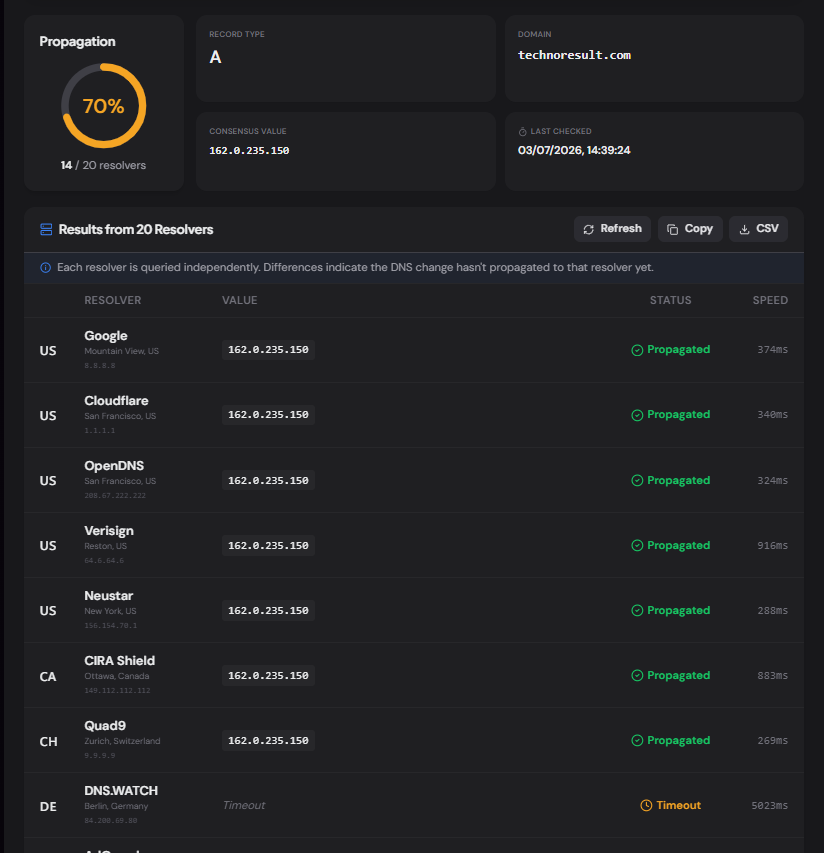
The DNS Propagation Checker queries 20 DNS resolvers worldwide to show you how far a DNS change has propagated. After updating a DNS record — changing an A record, adding an MX entry, or modifying SPF — it can take minutes to 48 hours for every resolver on the internet to pick up the new value. This tool shows you which resolvers have the update and which still have the old value cached.
It supports all major record types: A, AAAA, CNAME, MX, TXT, NS, SOA, PTR, and CAA. Results include the resolver's name, location, response value, status, and response time — plus a propagation percentage and consensus value so you can see the big picture at a glance.
How to Use the DNS Propagation Checker
- 1Enter Domain & Record Type:
Type the domain and select the record type (A, MX, TXT, etc.) then click "Check".
- 2Review Global Results:
The table shows the response from each resolver — its location, the values returned, status (propagated / timeout / error), and response time in milliseconds.
- 3Refresh to Track Progress:
Hit Refresh periodically to watch propagation climb. The percentage ring and "Last Checked" timestamp update on every refresh.
- 4Copy or Export:
Copy all results to clipboard or export as CSV for change-management documentation.
Key Features
Pro Tips
Lower TTL First
Before making a critical DNS change, lower the TTL to 300 seconds 24–48 hours ahead. When you make the change, propagation will be much faster because caches expire sooner.
Check Multiple Types
If you're migrating servers, check both A and MX records. A records may propagate first while MX is still cached, leading to mail going to the old server temporarily.
Refresh Periodically
DNS propagation isn't instant — run the check every 15–30 minutes after a change and watch the percentage climb. Export a CSV at each check for an audit trail.
Real-World Applications
Domain Migration
Track A and CNAME propagation when pointing a domain to a new hosting provider, so you know when traffic has fully shifted.
Email Changes
After updating MX, SPF, or DMARC records, verify the new values are live worldwide before telling users to test mail.
SSL Provisioning
CAA and CNAME propagation must complete before an ACME challenge (Let's Encrypt) can validate — check before retrying.
Related Networking Tools
MX Record Lookup
Check mail servers, detect providers, and verify email routing.
SPF Record Checker
Validate SPF records, count lookups, and detect providers.
DMARC Checker
Analyze DMARC policy, check alignment, and get a security score.
TXT Record Lookup
Look up all TXT records, classify them, and detect connected services.
The DNS Propagation Checker gives you real-time worldwide visibility into DNS changes. Instead of guessing whether your update has gone live, query 20 resolvers across 6 continents and see the answer. Supports every major record type, shows response times, calculates consensus, and exports to CSV. No sign-up, no API key, no cost.
More Networking Tools
SPF Record Checker
Validate SPF records, count DNS lookups against the 10-lookup limit, parse mechanisms, detect providers, and get a security score.
DMARC Checker
Check and validate DMARC records, analyze email authentication policies, verify SPF and DKIM alignment, and improve domain email security.
AAAA Record Lookup
Look up AAAA (IPv6) records, classify IPv6 address types, detect hosting and CDN providers, check reverse DNS, compare with IPv4, and export results.
Email Authentication Checker
Complete email authentication audit with MX, SPF, DMARC, DKIM, TXT, NS, IPv6 checks, provider detection, security scoring, and actionable recommendations.
NS Lookup
Look up nameservers for any domain, detect the DNS provider, health-check each server, view glue records and SOA, and verify DNS configuration consistency.
A Record Lookup
Look up A records for any domain, view IPv4 addresses, TTL, geographic location, hosting provider, reverse DNS, and autonomous system (ASN) information.