MX Record Lookup
Check mail servers, email authentication (SPF, DMARC, DKIM), provider and security gateway, and DNS health for any domain
Enter a domain to inspect its mail setup
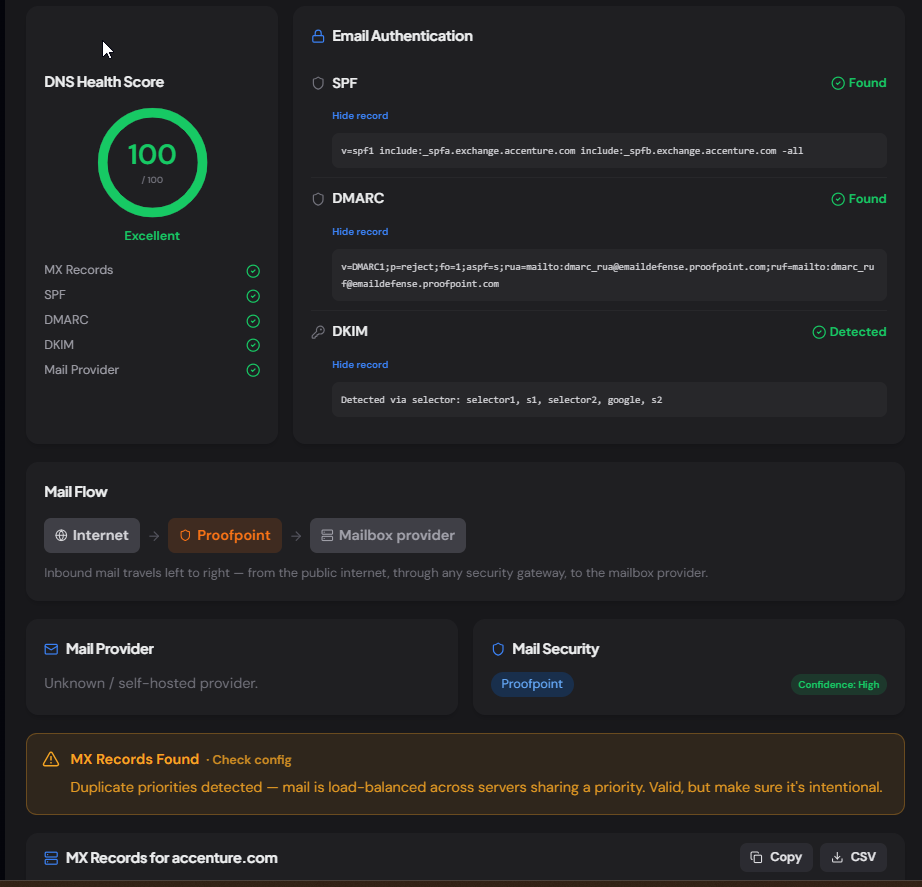
Get MX records with TTL, email authentication (SPF, DMARC, DKIM), provider and security detection, a mail-flow diagram, and a DNS health score.
What is the MX Record Lookup Tool?
The MX Record Lookup tool is a free utility that retrieves the MX (Mail Exchange) records of any public domain and shows you exactly which servers handle its email. Beyond the raw records, it detects the mail provider (Microsoft 365, Google Workspace, Zoho, and more), flags any email security gateway in front of the mailbox (Proofpoint, Mimecast, Barracuda), and runs a quick health check on the configuration.
MX records are DNS entries that tell sending mail servers where to deliver email for a domain. Each record carries a priority number — lower numbers are tried first, with higher numbers acting as backups. This tool reads those records live over DNS-over-HTTPS, sorts them by priority, and lets you copy them or export to CSV in one click — no sign-up, no API key.
How to Use the MX Record Lookup Tool
- 1Enter a Domain:
Type or paste any domain such as
google.comand click "Lookup MX". You can also paste a full URL likehttps://example.comor an email address likeuser@domain.com— the tool extracts the domain automatically. - 2Review Provider & Security Detection:
The tool identifies which email provider runs the mailboxes and whether a dedicated security gateway is filtering inbound mail. A domain can show both — many organizations route mail through a gateway that sits in front of the real provider.
- 3Check Configuration Health:
A health banner confirms whether records were found and flags common issues — duplicate priorities, a single point of failure, or missing records that could break mail delivery.
- 4Copy or Export the Records:
Use Copy to grab the records as tab-separated text, or CSV to download a spreadsheet-ready file — handy for tickets, runbooks, and migration checklists.
Key Features
Pro Tips
Lowest Priority Wins
Mail is delivered to the server with the lowest priority number first. If you're troubleshooting delivery, that's the server to test connectivity against before the backups.
Gateway In Front of Provider
If you see a security gateway like Proofpoint or Mimecast, the actual mailbox provider may be hidden behind it. Check SPF and DKIM records to confirm who ultimately delivers the mail.
No Records = No Mail
A domain with no MX records generally can't receive email. If you expected records and see none, the DNS may not have propagated yet, or mail isn't configured for that domain.
Real-World Applications
Email Troubleshooting
When mail bounces or goes missing, confirm the domain's MX records exist, point to the right provider, and have sensible priorities before digging deeper.
Security Auditing
Quickly see whether a domain routes mail through a security gateway, or whether it's exposing its mailbox provider directly — useful for vendor and acquisition due diligence.
Migration Planning
Document the current mail setup before migrating to a new provider, and verify the new MX records resolve correctly once the cutover is complete.
Common Mail Providers & Security Gateways
The tool recognizes the mail servers used by the most common email providers and security gateways. Here's what the MX records typically look like for each — useful for identifying a provider by hand when reading raw DNS.
Microsoft 365
*.mail.protection.outlook.comGoogle Workspace
aspmx.l.google.comZoho Mail
mx.zoho.comFastmail
in1-smtp.messagingengine.comProton Mail
mail.protonmail.chAmazon SES / WorkMail
inbound-smtp.*.amazonaws.comProofpoint
*.pphosted.comMimecast
*.mimecast.comCisco IronPort / ESA
*.iphmx.comBarracuda
*.barracudanetworks.comRelated Networking Tools
DNS Lookup
Query A, AAAA, CNAME, TXT, and NS records for any domain.
SPF Record Checker
Validate a domain's SPF record and authorized senders.
DMARC Checker
Inspect a domain's DMARC policy and alignment settings.
IP Address Lookup
Find geolocation, ASN, and host details for any IP address.
The MX Record Lookup tool is the fastest way to see how any domain handles its email — the mail servers, the provider behind them, the security gateway filtering inbound mail, and whether the configuration is healthy. Whether you're troubleshooting delivery, auditing a vendor, or planning a migration, enter a domain and get a complete picture in seconds. No sign-up, no API key, no cost.
More Networking Tools
TXT Record Lookup
Look up all TXT records for any domain, classify each record, detect 40+ connected services, check email authentication, and export results.
A Record Lookup
Look up A records for any domain, view IPv4 addresses, TTL, geographic location, hosting provider, reverse DNS, and autonomous system (ASN) information.
AAAA Record Lookup
Look up AAAA (IPv6) records, classify IPv6 address types, detect hosting and CDN providers, check reverse DNS, compare with IPv4, and export results.
NS Lookup
Look up nameservers for any domain, detect the DNS provider, health-check each server, view glue records and SOA, and verify DNS configuration consistency.
SPF Record Checker
Validate SPF records, count DNS lookups against the 10-lookup limit, parse mechanisms, detect providers, and get a security score.
DMARC Checker
Check and validate DMARC records, analyze email authentication policies, verify SPF and DKIM alignment, and improve domain email security.