YouTube Banner Downloader
Download the channel banner (channel art) of any YouTube channel in full quality across all device sizes
Paste a YouTube channel URL or @handle
Download the channel banner (channel art) in TV, Desktop, Tablet, and Mobile sizes — in JPG, PNG, or WEBP format.
What is the YouTube Banner Downloader?
The YouTube Banner Downloader is a free tool that lets you download the channel banner (also called channel art) of any public YouTube channel in four device-specific sizes — TV (2560×1440), Desktop (2560×423), Tablet (1707×423), and Mobile (1060×175). It also supports JPG, PNG, and WEBP download formats via server-side conversion.
YouTube channel banners are cropped differently depending on the device viewing the channel. The TV size is the full uncropped artwork at 2560×1440 — this is the definitive version. The Desktop, Tablet, and Mobile sizes are centre-cropped versions YouTube generates automatically. This tool gives you access to all four so you can use whichever fits your purpose.
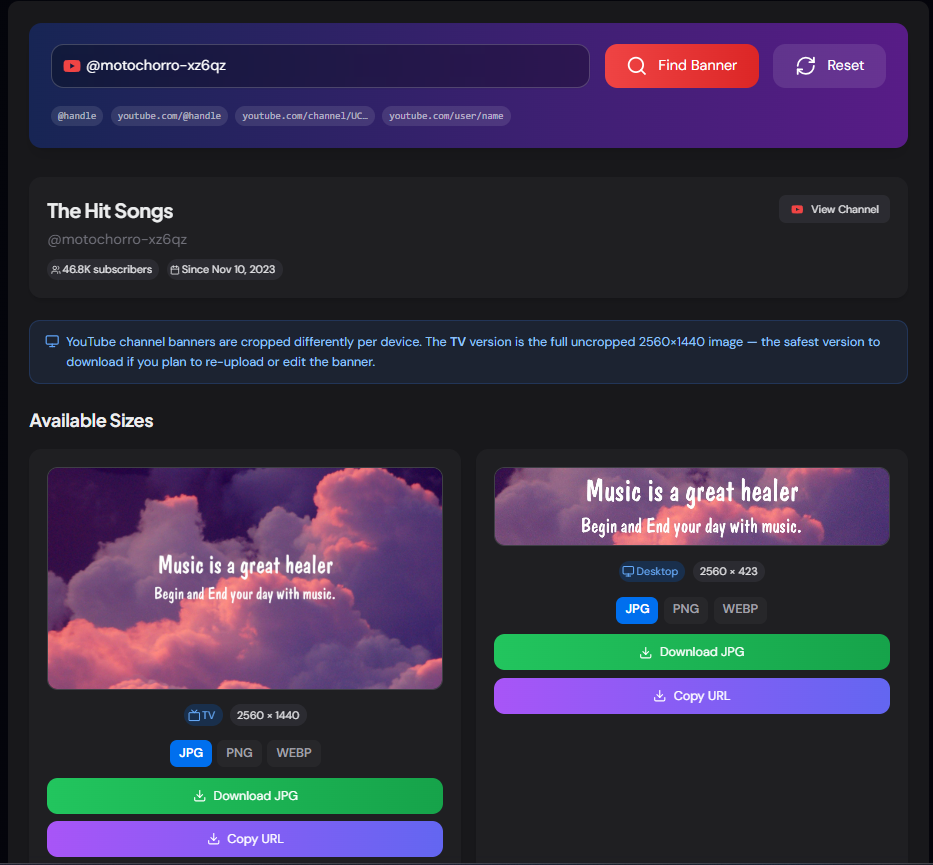
How to Use the YouTube Banner Downloader
- 1Enter the Channel URL or Handle:
Paste any YouTube channel link such as
youtube.com/@MrBeastoryoutube.com/channel/UCxxxxxxand click "Find Banner". - 2Preview All Four Device Sizes:
The tool displays the banner as it appears on TV, Desktop, Tablet, and Mobile — each with a live preview at the correct aspect ratio so you can see exactly how YouTube crops the artwork per device before downloading.
- 3Choose Format and Download:
Select JPG, PNG, or WEBP from the format buttons above each card, then click Download. The image is converted server-side and saved directly to your device — no browser workarounds or right-click-save required.
- 4Copy the Direct URL:
Use Copy URL to grab the direct CDN link for any size — handy for embedding in HTML, design tools, or documentation without saving the file first.
Key Features
Pro Tips
Always Start with TV
The TV size (2560×1440) is the full uncropped artwork — it contains the entire design the creator intended. If you're re-uploading or editing the banner, always use this version.
Check Each Device Preview
If you're designing a channel banner, use the Desktop, Tablet, and Mobile previews to check how YouTube will crop your artwork across devices before uploading. Text and logos in the outer edges get cut on mobile.
Pair with Profile Picture Tool
Use the Profile Picture Downloader alongside this tool to get both the banner and avatar in one session — useful for brand research or design mockups.
Real-World Applications
Brand Research
Analyse how successful channels design their channel art — colours, layout, text placement — to inform your own channel branding decisions.
Archive & Documentation
Researchers and journalists can archive a channel's visual identity at a point in time — useful when documenting channel rebrands or before a channel is deleted.
Design Mockups
Designers building YouTube channel mockups or pitch decks can download the actual banner assets rather than recreating them manually or using low-quality screenshots.
Related YouTube Tools
YouTube Profile Picture Downloader
Download channel avatars in small, medium, and high quality.
YouTube Channel ID Finder
Find the channel ID, stats, and API snippets for any channel.
YouTube Metadata Extractor
Extract full video metadata including title, description, and tags.
YouTube Thumbnail Downloader
Download video thumbnails in HD, Full HD, and 4K quality.
The YouTube Banner Downloader is the fastest way to get a clean, full-quality channel banner from any YouTube channel — in every device size YouTube supports. Whether you need it for design research, documentation, or brand analysis, paste the URL and download in seconds. No sign-up, no watermarks, no cost.
More YouTube Tools
YouTube Profile Picture Downloader
Download YouTube channel profile pictures and avatars in high quality using a channel URL, handle, username, or channel ID.
YouTube Channel ID Finder
Find and retrieve the unique Channel ID of any YouTube channel using a channel URL, custom URL, handle, or username.
YouTube Thumbnail Downloader
Download high-quality thumbnails from any YouTube video.
YouTube Channel Comparison
Compare two YouTube channels side by side. Analyze subscribers, total views, video count, creation date, country, and other channel statistics.
YouTube Channel Statistics Viewer
View YouTube channel statistics including subscribers, total views, video count, country, creation date, and channel information.
YouTube Hashtag Extractor
Extract hashtags from any YouTube video or channel description. Find trending hashtags, copy them instantly, and improve your YouTube SEO strategy.