YouTube Profile Picture Downloader
Download YouTube channel profile pictures and avatars in high quality using a channel URL, handle, username, or channel ID
Paste a YouTube channel URL or @handle
Download the profile picture of any public YouTube channel in small, medium, and high quality.
What is the YouTube Profile Picture Downloader?
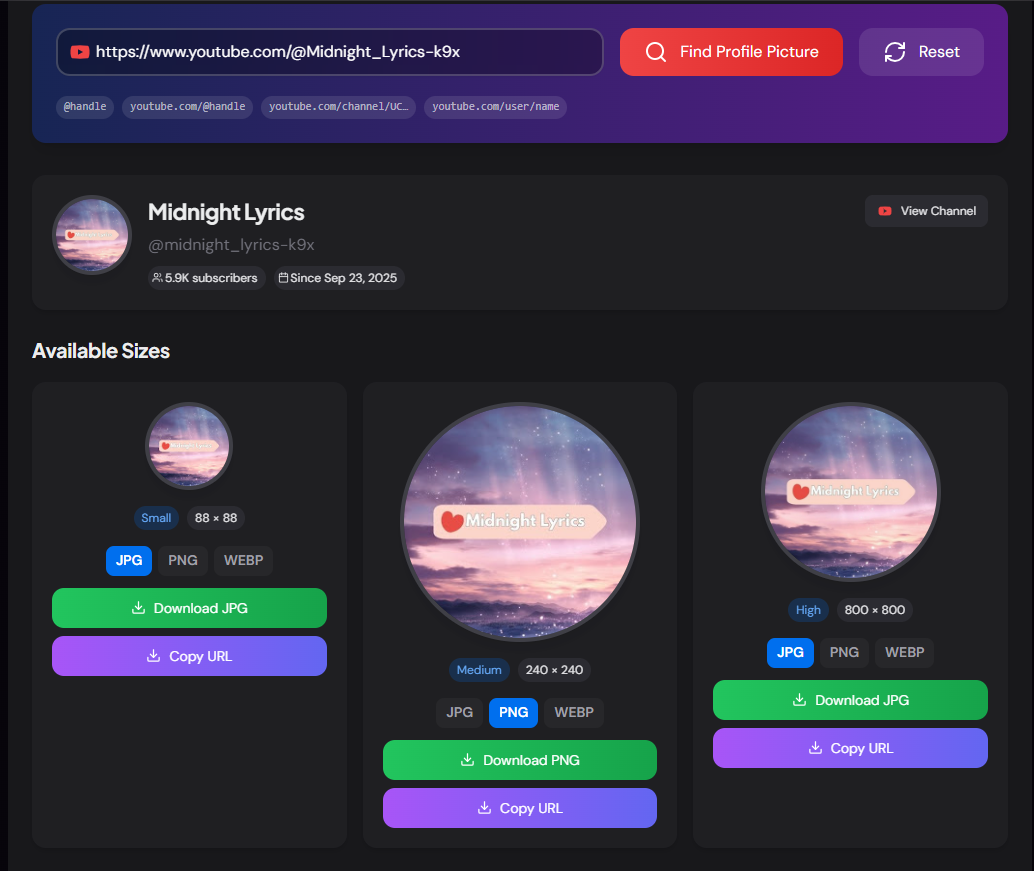
The YouTube Profile Picture Downloader is a free tool that lets you download the profile picture (channel avatar) of any public YouTube channel in three sizes — small (88×88), medium (240×240), and high quality (800×800). Paste a channel URL or @handle and get instant access to all available sizes with a single click download.
Whether you are a content creator referencing another channel, a designer building a YouTube-themed project, a researcher archiving channel data, or simply want to save a high-resolution version of a creator's avatar, this tool removes every friction point — no login, no extension, no screen capture needed.
How to Use the YouTube Profile Picture Downloader?
- 1Enter the Channel URL or Handle:
Paste any YouTube channel link such as
youtube.com/@MrBeastoryoutube.com/channel/UCxxxxxxinto the input and click "Find Profile Picture". - 2Preview All Sizes:
The tool displays the channel profile alongside three size options — Small (88×88), Medium (240×240), and High (800×800) — each with a live circular preview so you can compare quality before downloading.
- 3Download or Copy:
Click Download JPG to save the avatar directly to your device, or click Copy URL to copy the direct image URL for use in design tools, documentation, or code.
- 4Use Search History:
Recent searches are saved locally so you can quickly re-download avatars from channels you've already looked up without re-typing the URL.
Key Features
Pro Tips
Always Use High Quality
Always download the High (800×800) version first. YouTube delivers the largest available size at that key — some channels will return a smaller image if the creator never uploaded a high-resolution avatar.
Use the URL in Code
Copy the direct image URL and use it as a placeholder avatar in mockups, API documentation, or test data — it's a stable CDN URL that loads fast globally.
Pair with Channel ID Finder
If you also need the Channel ID for API work, use the Channel ID Finder tool — it accepts the same input formats and returns the ID alongside stats and API snippets.
Real-World Applications
Design & Mockups
Use high-quality channel avatars in UI mockups, presentation decks, or blog posts when referencing YouTube creators — without relying on screenshots.
Research & Archives
Researchers and journalists can archive channel avatars alongside other metadata for documentation purposes — especially useful before a channel rebrands.
App Development
Developers building YouTube-related apps can quickly grab avatar URLs to test image display components or populate seed data without setting up API auth.
The YouTube Profile Picture Downloader is the fastest way to get a clean, full-quality avatar from any YouTube channel. Whether you need it for design, documentation, research, or development, paste the URL and download in seconds — no sign-up, no watermarks, no cost.
More YouTube Tools
YouTube Banner Downloader
Download YouTube channel banners and channel art in high quality using a channel URL, handle, username, or channel ID.
YouTube Thumbnail Downloader
Download high-quality thumbnails from any YouTube video.
YouTube Channel ID Finder
Find and retrieve the unique Channel ID of any YouTube channel using a channel URL, custom URL, handle, or username.
YouTube Channel Comparison
Compare two YouTube channels side by side. Analyze subscribers, total views, video count, creation date, country, and other channel statistics.
YouTube Channel Statistics Viewer
View YouTube channel statistics including subscribers, total views, video count, country, creation date, and channel information.
YouTube Hashtag Extractor
Extract hashtags from any YouTube video or channel description. Find trending hashtags, copy them instantly, and improve your YouTube SEO strategy.