YouTube Channel ID Finder
Find and retrieve the unique Channel ID of any YouTube channel using a channel URL, custom URL, handle, or username.
Enter a YouTube channel URL or @handle
Instantly find the unique Channel ID along with subscriber count, video count, links, and ready-to-use API snippets.
What is the YouTube Channel ID Finder?
The YouTube Channel ID Finder is a free lookup tool built for developers, content creators, and digital marketers who need instant access to a channel's unique identifier. Every YouTube channel is assigned a permanent Channel ID that begins with "UC" — this ID never changes, even if the channel is renamed or re-branded.
Whether you are integrating the YouTube Data API v3 into an app, setting up an RSS feed reader, or simply need the raw identifier for a third-party service, this tool resolves any channel URL or @handle into a full data report instantly — no login, no API key on your end required.
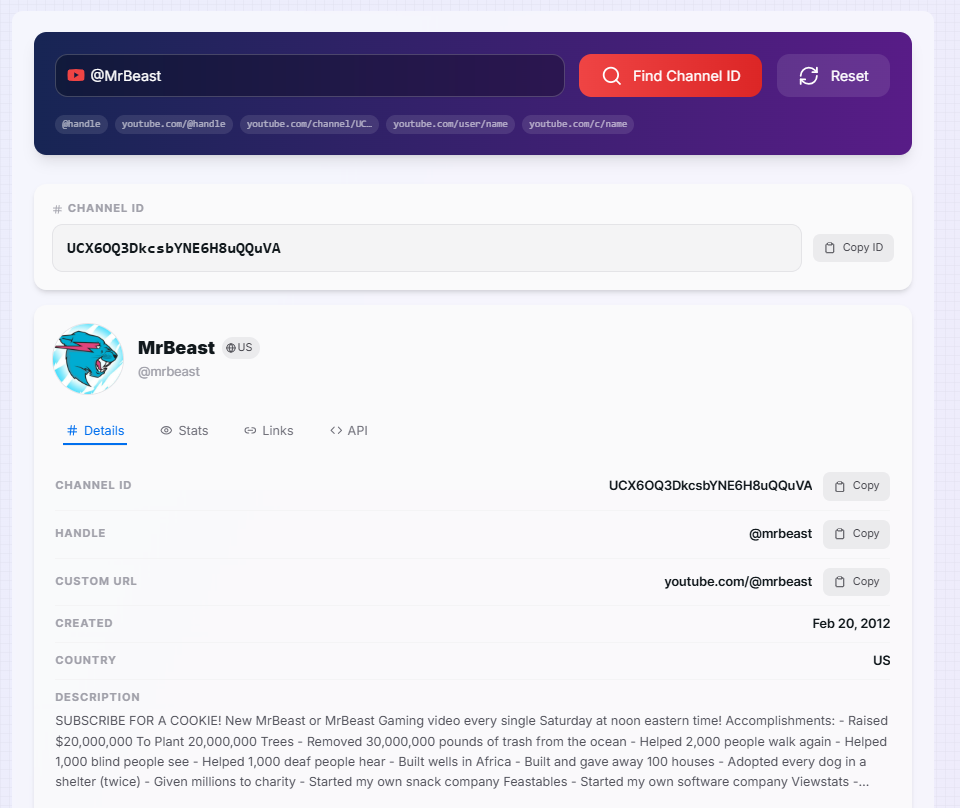
How to Use the YouTube Channel ID Finder?
- 1Enter a Channel URL or Handle:
Paste any YouTube channel link — such as
youtube.com/@MrBeastoryoutube.com/channel/UCxxxxxx— into the input field and click "Find Channel ID". - 2Copy the Channel ID:
The Channel ID is displayed immediately in a prominent code block at the top of the results. Click "Copy ID" to copy it to your clipboard in one click.
- 3Explore the Result Tabs:
Switch between the Details, Stats, Links, and API tabs to view full channel info, subscriber and view counts, all relevant URLs, and ready-to-use API snippets.
- 4Grab an API Snippet:
Open the API tab and copy the pre-built YouTube Data API v3 endpoint, RSS feed URL, or permanent channel link — all with your Channel ID already inserted.
Key Features
Pro Tips for Developers & Creators
RSS Without an API Key
Use the Channel ID to subscribe to a channel's RSS feed in any reader — no YouTube API key or OAuth required. Great for lightweight monitoring pipelines.
Permanent Deep Links
Always link to youtube.com/channel/UC… rather than a custom URL. If the creator renames their channel, your link still resolves correctly.
Bulk Research Workflow
Use the search history to look up multiple competitor channels back-to-back, then compare subscriber counts and creation dates to benchmark your own channel growth.
Real-World Applications
App Development
Feed Channel IDs directly into YouTube Data API v3 calls to build dashboards, analytics apps, or automated content aggregators.
Brand Monitoring
Track competitor or partner channels reliably by ID rather than by name — immune to re-branding events that would otherwise break your monitoring setup.
Creator Research
Quickly verify a creator's channel stats, country of origin, and account age before reaching out for brand partnerships or collaborations.
The YouTube Channel ID Finder removes the friction between a channel URL and the data you actually need. Whether you are shipping a developer integration, monitoring competitors, or setting up an RSS pipeline, having the correct Channel ID is the first step — and this tool makes that step instant. Start looking up channels now and take the guesswork out of your YouTube workflows.
More YouTube Tools
YouTube Banner Downloader
Download YouTube channel banners and channel art in high quality using a channel URL, handle, username, or channel ID.
YouTube Channel Comparison
Compare two YouTube channels side by side. Analyze subscribers, total views, video count, creation date, country, and other channel statistics.
YouTube Channel Statistics Viewer
View YouTube channel statistics including subscribers, total views, video count, country, creation date, and channel information.
YouTube Profile Picture Downloader
Download YouTube channel profile pictures and avatars in high quality using a channel URL, handle, username, or channel ID.
YouTube Hashtag Extractor
Extract hashtags from any YouTube video or channel description. Find trending hashtags, copy them instantly, and improve your YouTube SEO strategy.
YouTube Region Restriction Finder
Check the availability of a YouTube video across different regions.