YouTube Playlist Duration Calculator
Calculate the total watch time of any YouTube playlist instantly
Paste a YouTube playlist URL to calculate its duration
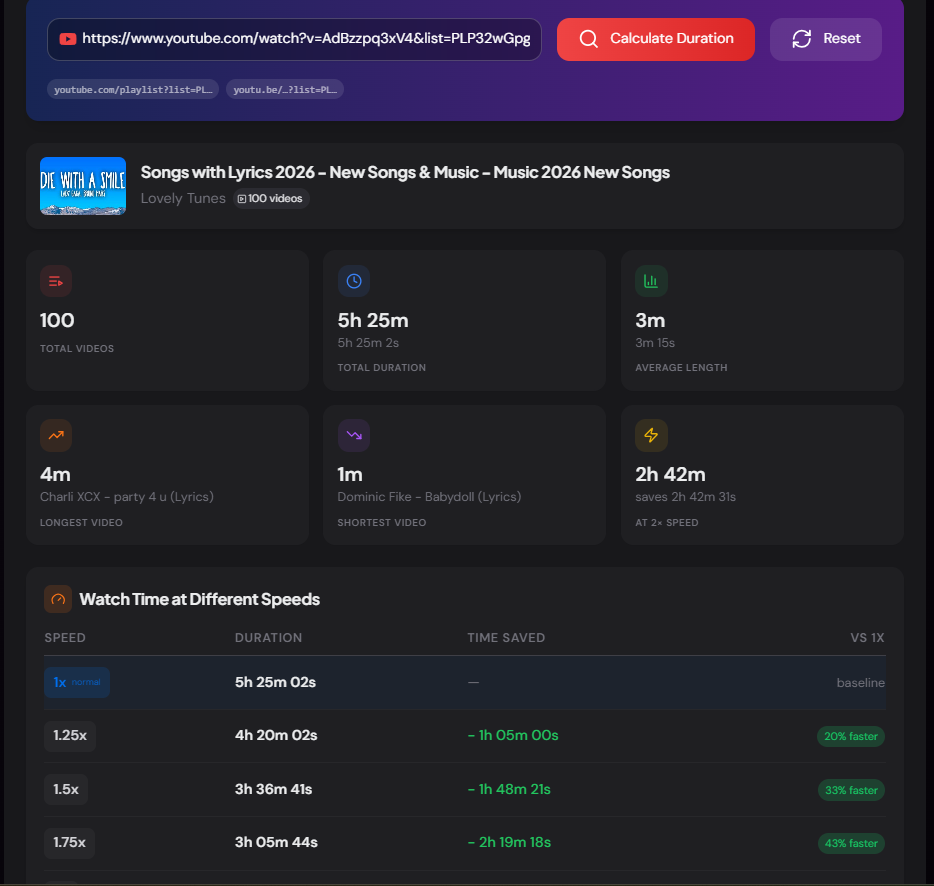
Get the total watch time, average video length, and see how long it takes at different playback speeds.
What is the YouTube Playlist Duration Calculator?
The YouTube Playlist Duration Calculator is a free tool that analyses any public YouTube playlist and calculates exactly how long it will take to watch — in full, and at every common playback speed. Paste a playlist URL and get the total duration, average video length, longest and shortest videos, and a complete speed-adjusted watch-time breakdown in seconds.
Whether you are a student sizing up an online course before enrolling, a professional preparing for a certification exam, or a creator auditing your own content library, this tool removes the guesswork from planning your viewing schedule. The built-in Completion Estimator even tells you how many days it will take based on how many hours per day you plan to watch.
How to Use the Playlist Duration Calculator?
- 1Paste the Playlist URL:
Open any public YouTube playlist, copy the URL from your browser, and paste it into the input field. Click "Calculate Duration".
- 2Review the Stats:
The tool fetches every video in the playlist and displays total duration, average video length, video count, and the longest and shortest videos.
- 3Check the Speed Table:
See the adjusted duration and time saved at 1×, 1.25×, 1.5×, 1.75×, and 2× playback speeds — each with a percentage saving shown at a glance.
- 4Use the Completion Estimator:
Set your daily watch time and preferred playback speed to get an exact day count for finishing the playlist — adjustable in real time with no page reload.
Key Features
Pro Tips
Course Evaluation
Before buying an online course or enrolling in a free YouTube curriculum, paste the playlist URL to see the exact learning time commitment — then use the estimator to build a realistic study schedule around it.
Speed Watching Strategy
Use the speed table to find your break-even point. Watching at 1.5× cuts a 10-hour playlist to under 7 hours — that's a full working day saved for longer certification courses and conference recordings.
Content Audit
Creators can analyse their own playlist to check average video length against channel benchmarks. If the longest video is an outlier, it may be worth splitting into a series to improve completion rates.
Real-World Applications
Students & Learners
Plan study sessions for YouTube-based courses, bootcamps, and tutorial series before committing time — especially useful for exam prep playlists.
Content Creators
Audit your own playlists to benchmark total watch time, identify unusually long or short videos, and ensure consistent episode length across a series.
Interview & Cert Prep
Calculate the time investment for technical interview prep playlists or certification study guides and create a realistic daily watching schedule.
Why Calculate Playlist Duration?
YouTube displays a total video count on playlists but never shows the total watch time. A playlist of 50 videos could be anywhere from 3 hours to 50 hours depending on the content type — tutorials, lectures, and documentaries all differ wildly in length. Without a duration total, it is impossible to plan a viewing schedule or estimate when you will finish a course.
The speed table addresses a real behaviour: the majority of YouTube users watch educational content at 1.25× or 1.5× to save time. Showing the time saved at each speed makes that decision concrete rather than abstract — you can see immediately that bumping from 1× to 1.5× saves over 4 hours on a 12-hour course.
The YouTube Playlist Duration Calculator turns a simple playlist URL into a complete time budget. Whether you are planning a learning sprint, auditing a content library, or just curious how long a series will take — paste the URL and get your answer in seconds.
More YouTube Tools
YouTube Earnings Calculator
Estimate YouTube earnings based on views, RPM, CPM, niche, and audience. Calculate daily, monthly, and yearly revenue for YouTube creators.
YouTube Video Comparison Tool
Compare two YouTube videos side by side. Analyze views, likes, comments, engagement rate, view velocity, duration, and publishing performance.
YouTube Channel Comparison
Compare two YouTube channels side by side. Analyze subscribers, total views, video count, creation date, country, and other channel statistics.
YouTube Region Restriction Finder
Check the availability of a YouTube video across different regions.
YouTube Video Statistics Checker
Check YouTube video statistics including views, likes, comments, duration, publish date, tags, hashtags, and engagement metrics.
YouTube Banner Downloader
Download YouTube channel banners and channel art in high quality using a channel URL, handle, username, or channel ID.