YouTube Video Comparison Tool
Compare two YouTube videos side by side — views, likes, comments, engagement rate, duration, and view velocity
Enter two videos to compare them head-to-head
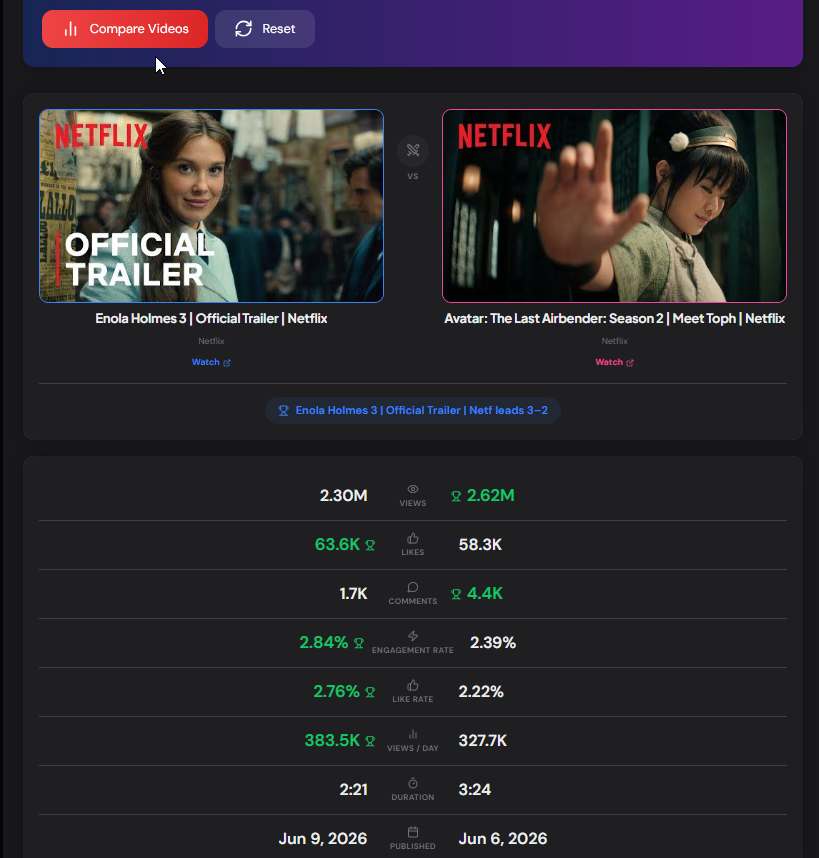
See views, likes, comments, engagement rate, like rate, view velocity, and duration side by side — with the leader highlighted for each metric.
What is the YouTube Video Comparison Tool?
The YouTube Video Comparison Tool puts two YouTube videos head-to-head, showing their performance metrics side by side with the leader highlighted for each. Compare views, likes, comments, engagement rate, like rate, view velocity, duration, and publish date — all pulled live from the YouTube Data API.
Comparing two videos by view count alone misses the real story. A video with fewer views but a higher engagement rate connected better with its audience. A newer video with strong view velocity may overtake an older one soon. This tool surfaces the ratio and rate metrics that reveal which video is genuinely performing better, then declares an overall winner.
How to Use the Comparison Tool
- 1Enter Two Videos:
Paste a video URL or ID into the Video A and Video B fields. Works with watch URLs, youtu.be links, Shorts URLs, and bare video IDs.
- 2Click Compare:
Both videos are fetched at once and displayed side by side with thumbnails, titles, and channel names.
- 3Read the Results:
Each metric row highlights the leading video in green with a trophy. An overall winner banner shows which video leads across the most categories.
What Gets Compared
Pro Tips
A/B Test Your Own Videos
Compare two of your own videos on similar topics to learn which format, length, or thumbnail style drove better engagement — then double down on what works.
Trust Engagement Over Views
When comparing videos with very different view counts, engagement rate is the fairer measure. A smaller video can decisively win here.
Check View Velocity
A newer video with high views-per-day may overtake an older one soon. Velocity tells you which video has current momentum, not just lifetime totals.
Real-World Applications
Content A/B Testing
Identify which of your videos performed best so you can replicate the winning format, hook, or topic in future uploads.
Competitor Benchmarking
Compare your video against a competitor's video on the same topic to see how your engagement stacks up against theirs.
Trend Analysis
Compare an older viral video against a recent one to understand how audience response to a topic has changed over time.
Related YouTube Tools
YouTube Video Statistics Checker
Deep-dive analytics for a single video — engagement, velocity, watch time, tags.
YouTube Channel Comparison Tool
Compare two whole channels head-to-head across subscribers and views.
YouTube Hashtag Extractor
Extract and copy all hashtags from any YouTube video.
YouTube Earnings Calculator
Estimate potential ad revenue from views and RPM.
The YouTube Video Comparison Tool gives you an instant, data-driven head-to-head between any two YouTube videos — ideal for A/B testing your own content, benchmarking against competitors, or analysing trends. All metrics are pulled live from the official YouTube Data API. Free, instant, and no sign-up required.
More YouTube Tools
YouTube Channel Comparison
Compare two YouTube channels side by side. Analyze subscribers, total views, video count, creation date, country, and other channel statistics.
YouTube Video Statistics Checker
Check YouTube video statistics including views, likes, comments, duration, publish date, tags, hashtags, and engagement metrics.
YouTube Channel Statistics Viewer
View YouTube channel statistics including subscribers, total views, video count, country, creation date, and channel information.
YouTube Earnings Calculator
Estimate YouTube earnings based on views, RPM, CPM, niche, and audience. Calculate daily, monthly, and yearly revenue for YouTube creators.
YouTube Playlist Duration Calculator
Calculate playlist duration, compare watch times across playback speeds, and estimate completion schedules.
YouTube Timestamp Link Generator
Create and share timestamped links for YouTube videos with custom labels.