RGBA to Hex Converter
Convert RGBA Color Codes to Hex with Real-time Preview
RGBA Input
Color Preview
What is the RGBA to Hex Converter?
The RGBA to Hex Converter is an essential bridge between different color languages. While RGBA (Red, Green, Blue, Alpha) is the preferred format for manipulating transparency in development, Hexadecimal is the industry standard for concise, shareable color codes in web design and branding.
This tool empowers designers and developers to translate complex color compositions into streamlined Hex strings. It handles both traditional 6-digit Hex codes and modern 8-digit Hex codes (which include Alpha transparency), ensuring that your exact opacity levels are preserved across different design environments and CSS files.
How to Use the RGBA to Hex Converter?
- 1Mix Your RGB Channels:
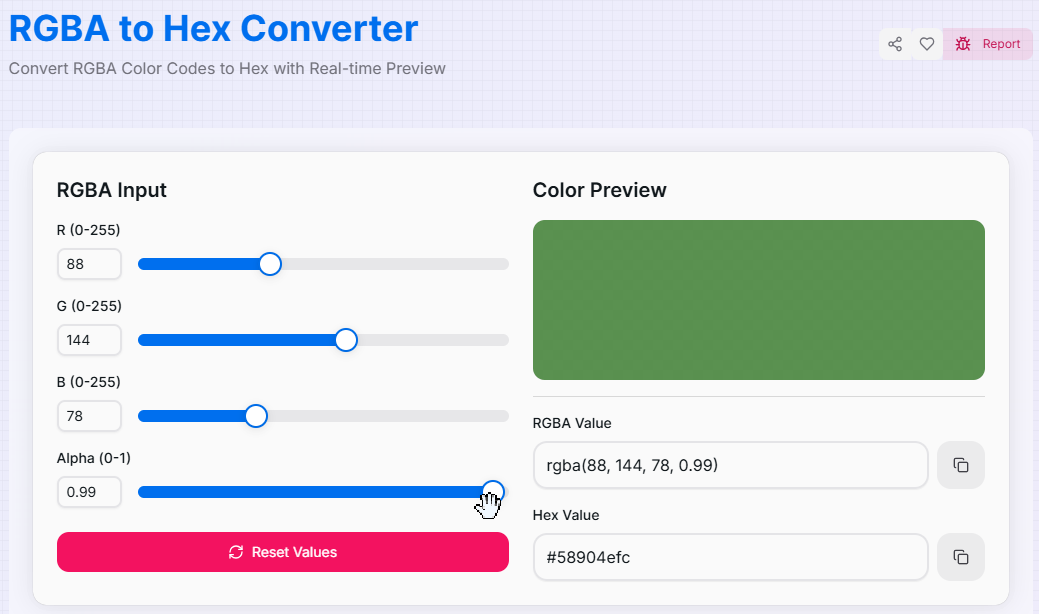
Adjust the Red, Green, and Blue sliders (ranging from 0 to 255) to mix your desired color. You can also type exact numeric values into the input boxes.
- 2Set Transparency (Alpha):
Use the Alpha slider (0 to 1) to define the opacity. The tool will automatically calculate the extra two characters needed for an 8-digit Hex code.
- 3Live Preview:
Observe the Real-time Preview as it shifts. The checkered background behind the preview helps you visualize exactly how transparent your color will appear.
- 4Export Hex Code:
Once satisfied, click the Copy icon to grab the Hex value. Use the Reset button () to quickly clear all channels.
Key Features
Pro Tips & Design Advice
Hex Opacity
If you need a 6-digit hex but have transparency, set Alpha to 1.0 before copying to ensure a solid color output.
8-Digit Usage
Modern browsers support 8-digit hex codes in CSS. Use them to keep your styles cleaner than long `rgba()` strings.
Mixing Neutrals
Keep R, G, and B values identical to create perfect grays. Adjust all three together to change the gray's lightness.
Real-World Applications
UI Prototyping
Converting color values from design tools like Figma or Sketch into dev-ready Hex codes for CSS/Tailwind.
Style Guides
Standardizing brand colors into Hex format for easier distribution in brand identity documentation.
Development
Quickly checking the Hex equivalent of an existing RGBA variable to simplify styling logic in React or Vue.
Stop manually calculating color codes. Whether you are building a professional design system or fine-tuning the opacity of a single button, our RGBA to Hex Converter provides the accuracy and speed you need. Experience the most intuitive way to manage color spaces and opacity today!
More Color Tools
Hex to RGBA Converter
Convert Hex color codes to RGBA format quickly.
HSL to HEX Converter
Convert HSL Color Codes to Hex with Real-time Preview.
HSV to Hex Converter
Convert HSV Color Codes to Hex with Real-time Preview.
CMYK to RGB Converter
Convert CMYK Color Codes to RGB with Real-time Preview.
HSL to RGB Converter
Convert HSL Color Codes to RGB with Real-time Preview.
HSV to RGB Converter
Convert HSV Color Codes to RGB with Real-time Preview.