PNG to WebP Converter
Convert your PNG, JPG, and JPEG images to WebP format for faster websites and smaller file sizes. Support for batch conversion, quality adjustment, and more!
or drag and drop files here (max 10MB per file)
Conversion Options
Higher quality = larger file size (80% recommended)
What is the PNG to WebP Converter?
The PNG to WebP converter is a powerful tool designed to convert your PNG and JPEG images into a more efficient WebP format. Developed by Google, WebP offers better compression and quality characteristics, resulting in smaller file sizes without renouncing image quality. This converter is tailored for web developers, designers, content creators, and anyone looking to customize the performance of their website.
With support for batch conversion, quality adjustment, resizing, and detailed figures, our converter makes optimizing your images easier and improves the loading time of your website. WebP images are usually 25–35% smaller than PNG and JPEG files, making them ideal for modern web applications.
How to Use the PNG to WebP Converter?
- 1Upload your images:
Click the "Select PNG, JPG files" button or simply drag and drop your images into the designated upload area.
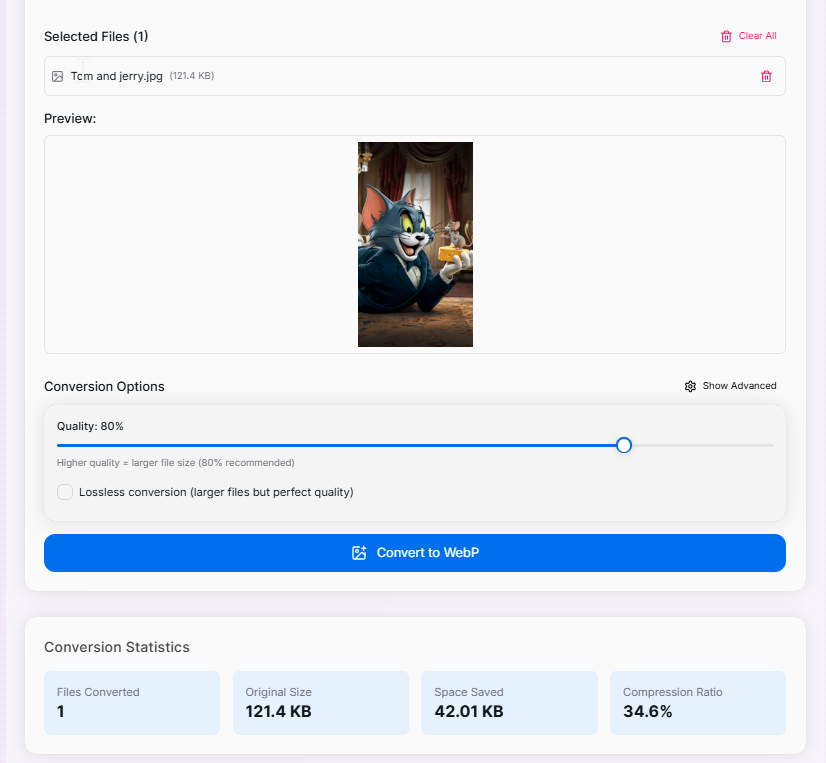
- 2Configure settings:Adjustment:Set your desired quality level and advanced conversion options if needed.
- 3Convert files:
Click the "Convert to WebP" button and wait a moment for the optimization process to complete.
- 4Download results:
Review your size savings in the statistics panel, then download individual files or use "Download All" for bulk saving.
Benefits of Using WebP Format
Advanced Features
Quality Control
Fine-tune the compression level to find the perfect balance between file size and image fidelity.
Lossless Mode
Maintain perfect image quality with lossless compression options for pixel-perfect requirements.
Image Resizing
Resize your images during the conversion process with options to preserve aspect ratio.
Batch Processing
Convert multiple files simultaneously to save time, rather than processing images one by one.
Statistics
Get comprehensive information about file size savings to understand the impact of optimization.
Live Preview
Compare your images before and after conversion to ensure quality standards are met.
Features That Make Us Stand Out
- Client-Side Processing: Your images never leave your computer, ensuring enhanced privacy and security.
- Detailed Size Comparison: See exactly how much space you're saving with clear "before and after" metrics.
- Image Preview: Review your converted images instantly to ensure they meet your quality expectations.
- Format Validation: We automatically check file compatibility before processing to prevent errors.
- Bulk Download Options: Save time by downloading all your converted images at once with a single click.
- Progress Tracking: Monitor the conversion status of batch jobs in real-time.
Ready to optimize your images and speed up your website? Try our PNG to WebP Converter now and experience the benefits of smaller, faster-loading images without compromising on quality. Whether you're a web developer looking to improve page performance or a content creator aiming to reduce storage usage, our tool provides the perfect solution for modern image optimization needs.
More Image Tools
PNG to SVG Converter
Convert PNG images to SVG format.
SVG to PNG Converter
Easily convert your SVG files to high-quality PNG images with our fast and reliable SVG to PNG Converter.
Base64 to Image Converter
Effortlessly convert Base64 encoded strings back to images for easy viewing and downloading.
Image to Base64 Converter
Effortlessly convert your images to Base64 encoded strings for easy embedding in HTML, CSS, or JavaScript.
Image Resizer
Resize images to specific dimensions effortlessly. Choose from PNG, JPEG, or WebP formats and preserve quality for web use and social media.
Image Average Color Finder
Analyze images to find their average and dominant colors effortlessly. Perfect for designers, artists, and anyone looking to create cohesive color palettes for their projects.