CNAME Lookup
Look up CNAME records, follow the full chain, detect CDN and hosting services, resolve final IPs, and export results
Enter a domain to look up its CNAME chain
Follow the full CNAME chain, detect CDN and hosting services at each hop, resolve the final IP addresses, and export the results.
What is the CNAME Lookup Tool?
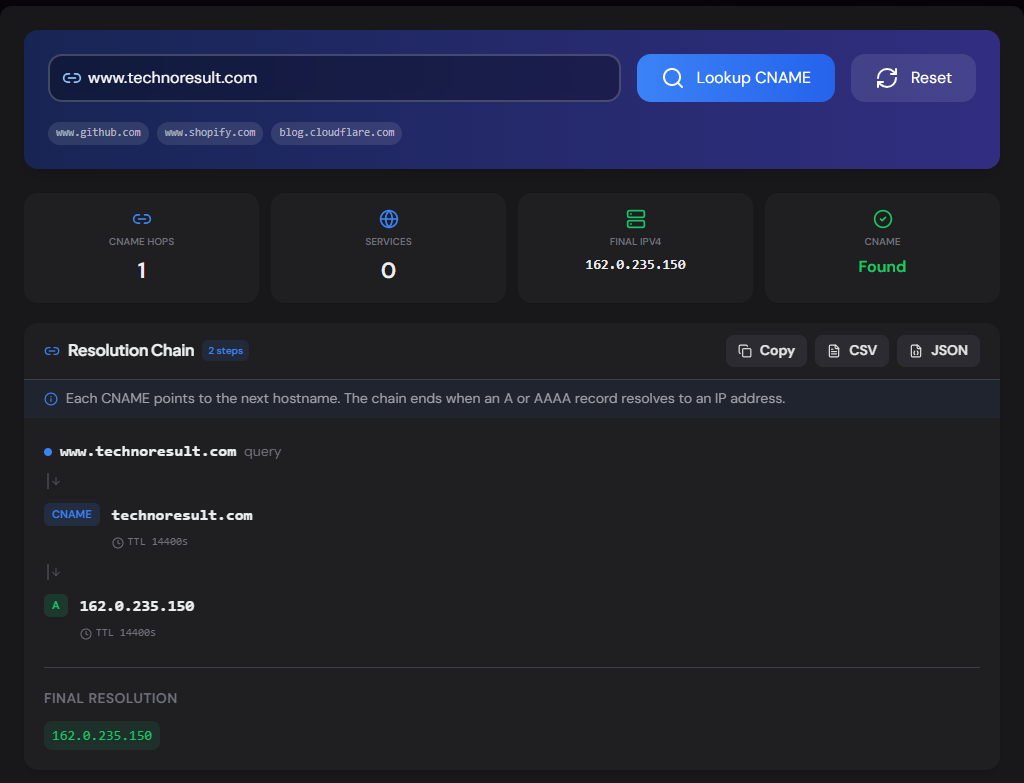
The CNAME Lookup tool retrieves the CNAME record for any hostname and follows the entire chain — CNAME to CNAME to final A/AAAA record — showing every hop along the way. At each step, it detects which CDN, hosting provider, or SaaS platform the hostname belongs to, so you can see exactly how traffic is routed without reading raw DNS output.
A CNAME (Canonical Name) record is a DNS alias — it says "this hostname is actually another hostname." They're used extensively for CDN routing (Cloudflare, CloudFront), platform hosting (Vercel, Netlify, GitHub Pages), SaaS custom domains (Shopify, HubSpot), and Microsoft 365 service records. This tool makes the chain visible and identifies who's involved at every step.
How to Use the CNAME Lookup Tool
- 1Enter a Hostname:
Type a hostname like
www.github.comand click "Lookup CNAME". Use subdomains — naked domains rarely have CNAME records. - 2Follow the Chain:
The visual chain shows every hop from your query to the final IP — with record type, TTL, and detected service at each step.
- 3Identify Services:
Detected CDNs, hosting platforms, and SaaS providers are shown as badges at each hop and summarized at the top.
- 4Copy or Export:
Copy the full chain or export as CSV / JSON for documentation.
Key Features
Pro Tips
Use Subdomains
Naked/apex domains (e.g. example.com) can't have CNAME records per the DNS spec. CNAMEs live on subdomains like www, blog, or shop.
Short Chains = Fast DNS
Every CNAME hop adds a DNS lookup. A 4-hop chain means 4 sequential queries before the browser gets an IP. If latency matters, flatten your chain or use A records directly.
Verify CDN Setup
After pointing a subdomain to a CDN, use this tool to confirm the chain reaches the CDN's edge hostname — a wrong CNAME target is one of the most common CDN misconfigurations.
Real-World Applications
CDN Verification
Confirm your CDN CNAME is correctly configured and traffic is routing through the expected edge network.
Competitive Intel
See which CDN, hosting, or platform a competitor uses by checking their www, app, or shop subdomains.
Subdomain Takeover
If a CNAME points to a service that's been deprovisioned (e.g. deleted Heroku app), it's a subdomain takeover vulnerability.
Common CNAME Targets
GitHub Pages
username.github.ioVercel
cname.vercel-dns.comNetlify
site.netlify.appCloudflare Pages
project.pages.devAWS CloudFront
d1234.cloudfront.netShopify
shops.myshopify.comAzure App Service
app.azurewebsites.netGoogle Cloud Run
ghs.googlehosted.comRelated Networking Tools
NS Lookup
Check nameservers, detect DNS provider, health-check each server.
DNS Propagation Checker
Check DNS propagation across 20 global resolvers.
MX Record Lookup
Check mail servers, detect providers, and verify email routing.
TXT Record Lookup
Look up all TXT records, classify them, and detect connected services.
The CNAME Lookup tool goes far beyond showing a single target hostname — it follows the entire chain, detects 60+ CDN, hosting, and SaaS providers at each hop, resolves the final IPs, and flags misconfigurations like circular references and dangling CNAMEs. Whether you're verifying a CDN setup, investigating a competitor's stack, or hunting subdomain takeover risks, enter a hostname and see the full picture. No sign-up, no cost.
More Networking Tools
AAAA Record Lookup
Look up AAAA (IPv6) records, classify IPv6 address types, detect hosting and CDN providers, check reverse DNS, compare with IPv4, and export results.
TXT Record Lookup
Look up all TXT records for any domain, classify each record, detect 40+ connected services, check email authentication, and export results.
A Record Lookup
Look up A records for any domain, view IPv4 addresses, TTL, geographic location, hosting provider, reverse DNS, and autonomous system (ASN) information.
NS Lookup
Look up nameservers for any domain, detect the DNS provider, health-check each server, view glue records and SOA, and verify DNS configuration consistency.
MX Record Lookup
Check mail servers, detect the email provider and security gateway, verify SPF/DMARC/DKIM, and get a DNS health score for any domain.
SPF Record Checker
Validate SPF records, count DNS lookups against the 10-lookup limit, parse mechanisms, detect providers, and get a security score.